In Cora PPM (ProjectVision) ships with three standalone Windows Service connectors that synchronise data between Cora PPM and third-party systems automatically. Each connector runs as an independent background service, polls or responds to a configurable schedule, communicates with the external system and with Cora PPM's own REST Web API, and sends email notifications about the outcome.
Why integrate
There are a number of reasons why customers want to integrate their own or 3rd party applications with Cora. Cora delivers a single version of the truth providing the right information to the right people, allowing customers and their clients to make better decisions and uphold strong governance. The reasons and types of integrations vary from customer to customer, depending on the use case(s) they describe to Cora Systems.
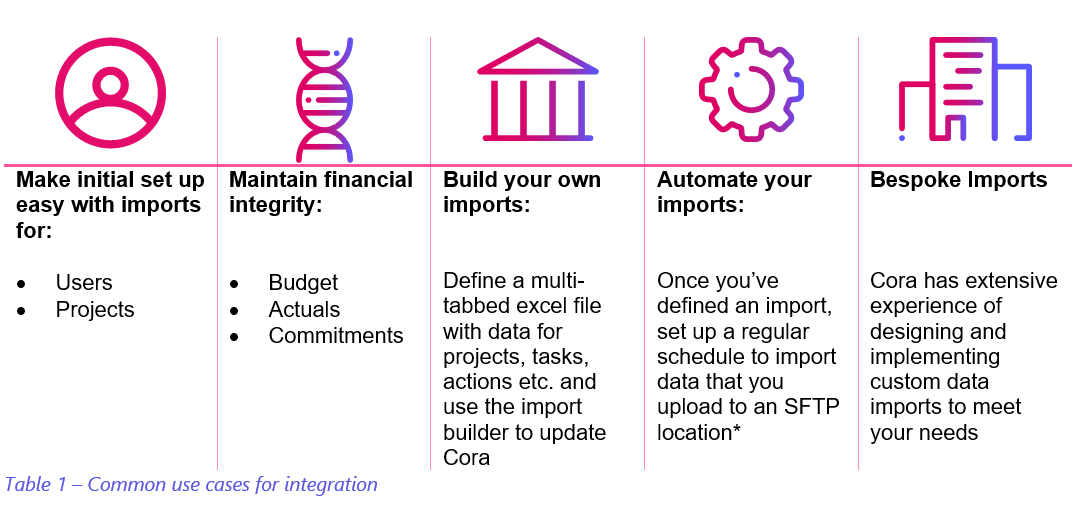
The most common use case is to centralise project, programme and portfolio managed by pulling information from other systems into a platform to provide a single truth. This ensures a number of key benefits, which may include:
- Enables a common, standardized approach across programmes
- Enables centralized management of complex governance structures
- Supports delivery through evidence-based decision making
- Supports real-time reporting and interrogation of data
- Maximizes opportunities for multi-locational collaboration
- Reduced cost through the removal of duplication
- Drives effective risk management
- Provides confidence in programme delivery
- Fast identification of programmes in distress
- Improved quality of programme management products
Integrations Capability
Cora provides at least three ways to integrate with the rest of your enterprise technology estate;
Low-Code Cora Connectors: These provide near out-of-the-box integration to common business applications. We currently have a connector to SharePoint (for document storage) and MS ADO/TFS with connectors to Salesforce™ and Microsoft Teams™ in development. A small amount of configuration will be required by your IT support team working with Cora’s support team
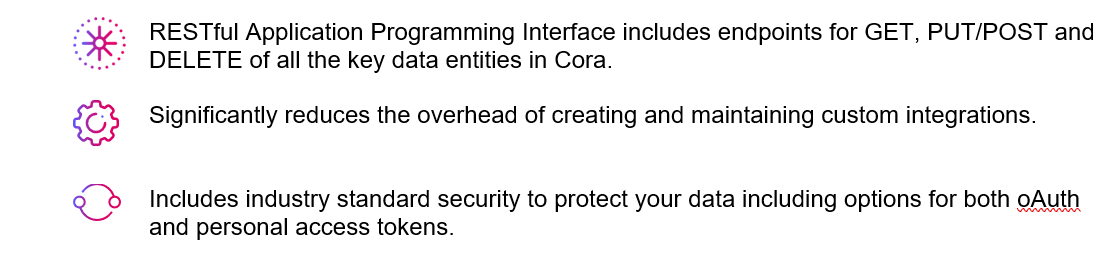
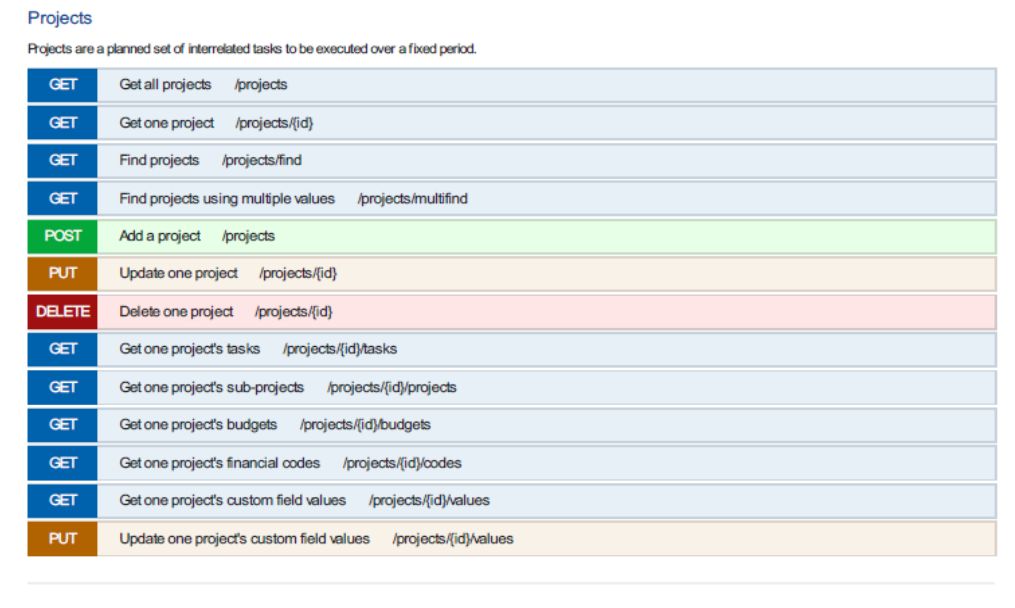
Cora API (Application Programming Interface): A full-featured RESTful Application Programming Interface that provides endpoints to all the key data in Cora. Your IT Development teams can easily integrate Cora into your service orientated architecture
Cora Bespoke Development: Where a connector is not available or you do not have in-house IT expertise to leverage the API, Cora has extensive experience of creating solutions to integrate Cora with your other enterprise systems
The way in which you integrate with your / 3rd party applications will depend again on the use case as well as other factors such as technology, platform, software versions, quantity and quality of data sources, etc. In some cases, more than one method might be used, consult your Cora representative to discuss these options in more detail.
Vendor Applications
Commercially available 3rd party applications that Cora has / can integrate with is summarised below.
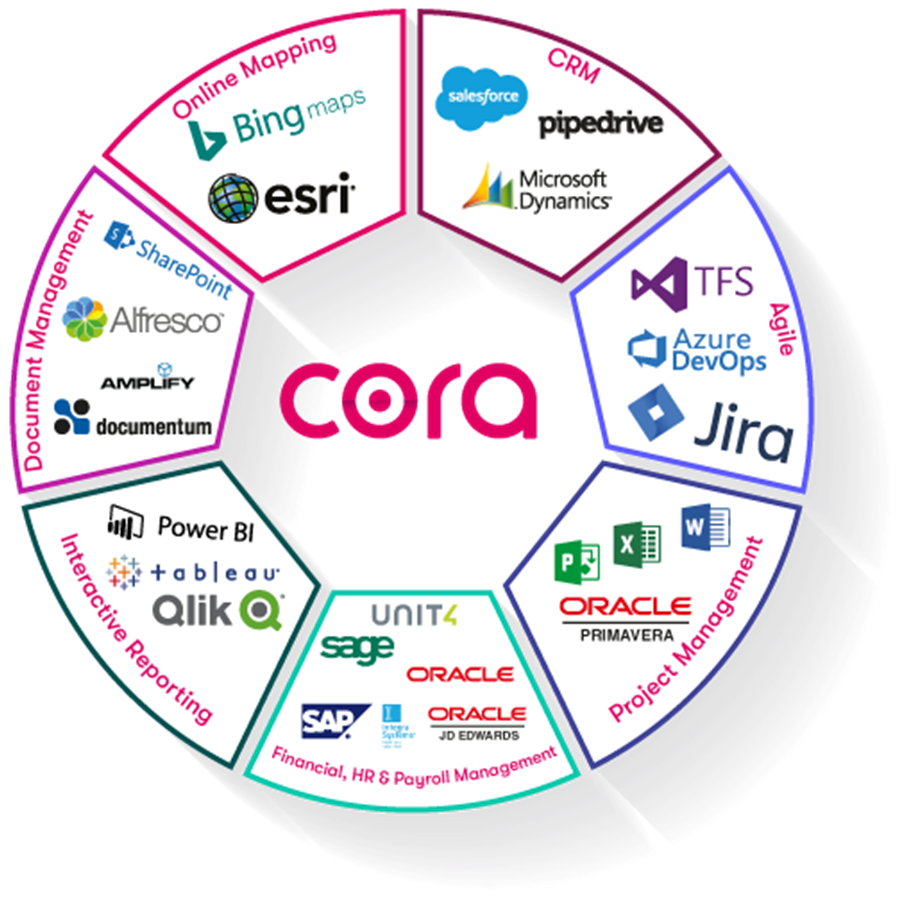
There are many interfaces and connectors available within Cora PPM to ensure a seamless world for customers. This list is continuously updated as Cora Systems invest in new interfaces and connectors for customers.
We also continue to expand our Restful API to enhance the sharing of data with other platforms that customers are using our mobile Apps (iOS and Android) use our API to continuously connect to the project/programme/portfolio for real-time information.
Architecture
Cora is developed on Microsoft’s Visual Studio 2017 development environment. Team foundation Server (TFS) is used to manage the development backlog within an Agile development environment.
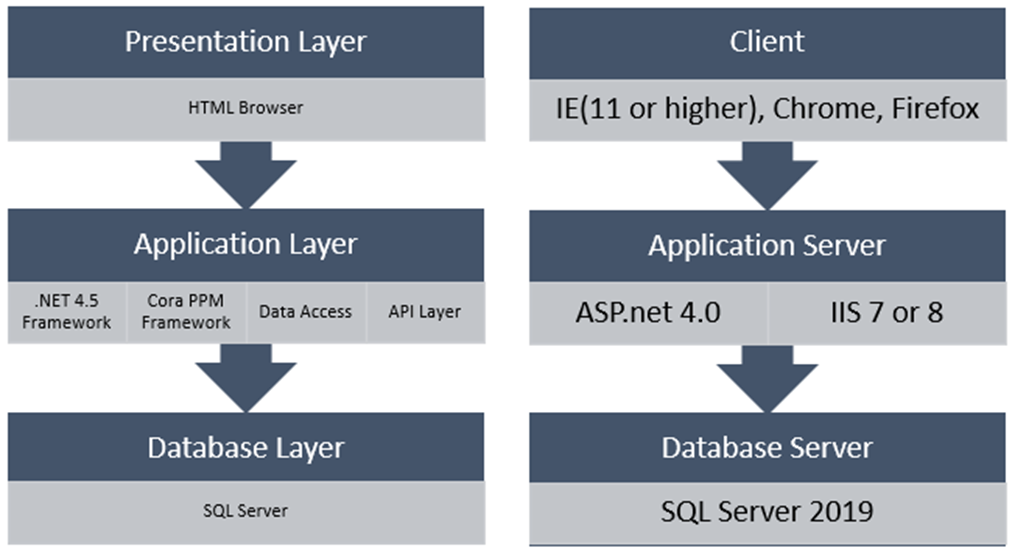
The Cora Systems development team develop applications using the best design techniques to eliminate security issues such as SQL injection etc. Cora uses “IronWasp” as the application scanner tool to ensure that common security weaknesses are discovered and fixed.
The system can be hosted on a Microsoft Windows Standard or Enterprise Server versions 2008 to 2012 and can run on a virtual or physical server.
Integration Points from 3rd Party data Source
Below is an illustration of a sample of 3 types of integration, as in
- Push Data Direct from 3rd Party to Cora PPM API – using iPaaS /other ESB Technology.
- Push Data via flat file from 3rd Party to Cora PPM API – using iPaaS /other ESB Technology.
Push Data via flat file from 3rd Party to secure FTP site (sFTP) – using Cora service to load data into Cora PPM via API on demand / scheduled.
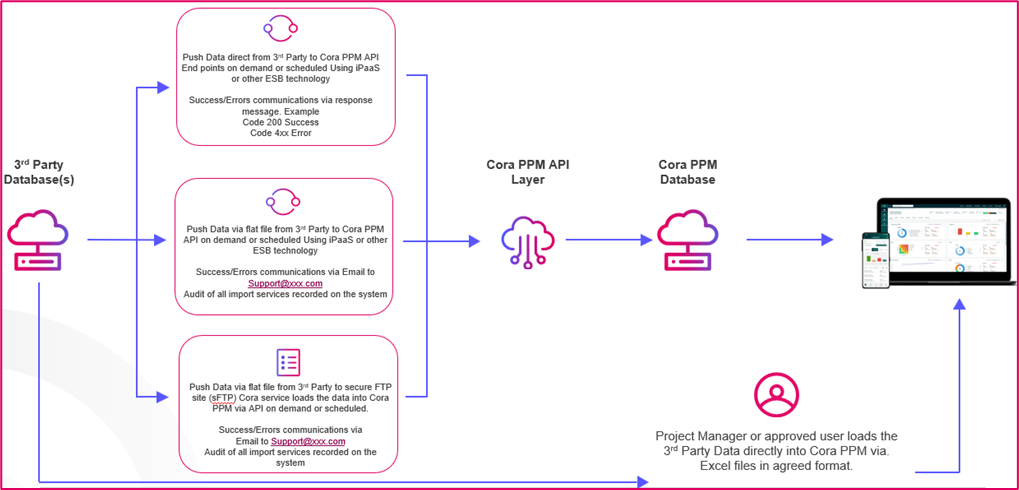
Where the integration data push is ‘scheduled’ or ‘on demand’, this is usually limited to Administrators and Cora will usually recommend scheduled to be set during off peak/low working hours to avoid performance concerns.
Using a Flat file Structure
When using a Flat File (options 2 and 3 in the previous section) to push data from a 3rd party application to Cora, this sample illustration describes of the process flow of data for that flat file.

That file or spreadsheet such as a CSV, (if for example the integration was to push Project Costs from an ERP such as SAP or Oracle ERP), this would need to include the following data as a minimum.
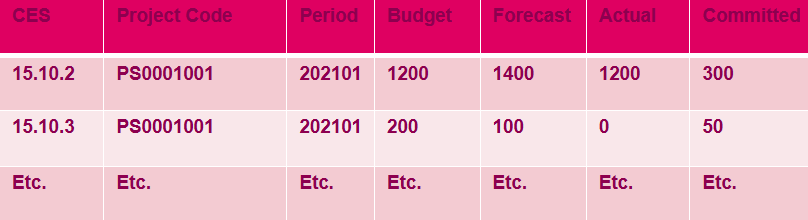
This however varies from customer to customer depending on a number of factors, the business process, the applications, the technology, data quality and quantity etc.
General Prerequisites for All Three Integrations
- All three integrations run as Windows Services on the Cora application server. They are not UI features you click inside the Cora PPM web interface — they are background services installed and configured by an administrator.
- Each service is automatic-start and runs as Local Service.
- Configuration is stored in the service's
App.config/Web.configand (for Analog and Users) in anImportSettings.xmlfile. - Logging is via NLog — check the NLog log files for run details and errors.
- A database table controlled by the stored procedure
IntegrationConfiguration_Get_Value_By_Key/IntegrationConfiguration_Upsertholds on-demand trigger flags.
Cora PPM (ProjectVision) ships three dedicated background-service integrations, each implemented as its own standalone Windows Service / console-mode host that runs independently alongside the main web application. They share a common service-hosting library (CORA.WindowsServiceLib) and all follow the same pattern: an internal timer fires periodically, pulls records or files from a watched location, processes each one in a background thread, and sends email notification on success or failure.
1 — Honeywell Project Details Import Service (ProjectDetailsImportService)
This is a file-based, Excel-driven integration purpose-built for Honeywell's project management data feeds. It watches a configured inbox folder for Excel files (.xls/.xlsx), validates each file's name format and contents against a flexible XML/JSON mapping configuration, then updates a rich set of Honeywell-specific and standard Cora PPM data tables. It can create new projects from a template, move projects between hierarchical district/region/pole folders, manage opportunities (from Salesforce SFDC feeds), update financial figures (ITD, YTD, MTD, FCT, EAC, commitments, AR ageing, unbilled AR, forecast labour/non-labour/commitment details), maintain currency rates, profit-centre hierarchies, vertical markets, and inactive-user lists. It logs every decision, emails results (success or rejection) with detailed per-row error reports, and pulses a health-check record in the database. The service name registered with Windows SCM is "ProjectDetailsImport" and the display name is "Honeywell Project Details Import".
2 — Financial File Import Service (Cora.FinancialImport)
This is the general-purpose financial actuals import service, handling cost-book, SAP, capacity and materials data from CSV/TXT/XLSX files. It watches a configurable active-file folder (or, when the PaaS feature flag is enabled, an Azure Blob Storage container), reads financial transactions and maps them into Cora PPM's advanced financials layer: task-level FMS actuals, purchase orders (new and amended), dispatch and shippable materials, SCM/Cobra capacity-planning imports, and forecast actuals (including task-level and commitment forecast actuals). On each successful file it can transfer data to the cost book, rebuild S-Curve profiling, update forecast overviews, and trigger task-scheduler rearrangement. It sends rich HTML email reports with per-type row counts and bypass summaries. The service name is "FinancialImport" and the display name is "Financial financial Import".
3 — Car ALC API Import Service (Cora.CarALC.ApiImport)
This is a JSON API–driven integration for the ALC (Automatic Level Control / a specific client named Car ALC). Instead of watching a file folder it polls a database staging table (ProjectRepository.UnprocessedRecordsExist) for JSON flat-file payloads that have been written there by an upstream API. Each payload represents a project and carries its financial tasks, transactions (labour actuals), commitments, and EAC-revision metadata. The service resolves a hierarchical folder structure (Branch → Location → PM-named folder) by the project's 10-character Order-ID code, auto-creating folders from a configurable template if missing. It creates or moves projects, updates skill-cost rates per company code, writes forecast commitments and actuals, runs EAC-adjustment completion workflows, updates the forecast overview, and archives/unarchives projects when the operations status changes. It reads from the database API Master Log table rather than from files on disk. The service name is "CarAlcApiImport" and the display name is "Car ALC API File Import".
Where to find the three services in Cora PPM
All three are server-side background services, not features accessible from the Cora PPM web UI. They are installed on the application server (or container) as Windows Services and managed via the Windows Services console (services.msc) or scripted via sc.exe.
Customer Integration Stories
Story 1: Automated Logic
At Automated Logic, we've been developing and supporting intelligent building solutions that have helped customers operate their buildings more efficiently for over 40 years. We take pride in being global leader in building automation systems and working with customers ranging from small, family-owned businesses to Fortune 500 corporations.
For more information see https://www.automatedlogic.com/
Use Case
The use case for the integration was for better synchronisation between the ERP and their project portfolio management system, Cora. Thereafter ALC need a platform to make EAC adjustments to better forecast planned expenditure from project manager adjustments. The last use case was to have a platform for Project Managers to load a Bill of Materials BOM so as to streamline the procurement process with the buying team. It was therefore decided to build 3 integrations.
Project Setup and Project Financial from ERP to Cora
The main system of truth for ALC is their ERP. ALC wanted project details, for example Name; Project ID; Project Manager & other key roles, and project financials to be sent to Cora. The integration would be the only way new projects were to be created in Cora, which would be sent as the projects were booked in ERP. Project Financials needed to be sent multiple times per day, However, they needed financial import to be paused during the forecast period for financials to stay static.
EAC Adjustments
ALC had moved all financial processes – forecast, WIP and EAC – to Cora. However, EACs needed to get back over to the ERP. ALC needed a near real time integration to get these adjustments back to the ERP as the EACs were approved via a workflow in Cora.
Material Procurement Tool
ALC would the ability for Project Manager to be able to load a Bill of Material (BOM) and then create order for materials that then would be sent to their purchasing team for procurement. Updates on orders then will be pushed back to Cora.
Technology
Applications/Middleware used can be summarised as follows;
For the Project Setup/Project Financial integration from ERP to Cora
- Application used: Microsoft Dynamics Solomon (MSD SL)
- Current: Flat File via sFTP
The next phase of the integration project is planned by converting from the flat file process to directly via the Cora API, also using the Catalina API (Middleware)
For the EAC Adjustments integration from Cora to the ERP
- Application used: Microsoft Dynamics Solomon (MSD SL)
- API & Middleware: Catalina API
For the Material Procurement Tool integration
- Application Used: eParts Services
- Cora API
Timeline
- For the Project Setup/Project Financial integration from ERP to Cora – 45 days
- For the EAC Adjustments integration from Cora to the ERP - 9 months. (A number of customer audit procedures required new requirements to complete thus taking time)
- Material Procurement Tool - 3 months
Risks, Issues and Recommendations
Flat files were originally sent 3 times daily, and then was increased to 8 times daily. This increased the effort to manage and the load on services. The need for current data kept increasing as users became more and more familiar with the system. Therefore, this is being converted to an API in the next phase to be near real time and trigger as soon as change is made in the ERP. The immediate need for this conversion came with the EAC process. Therefore, the recommendations are to use the Cora API rather than Flat File imports to better support synchronic systems.
Story 2: Honeywell HBS
Buildings affect people every moment of every day. And at Honeywell Building Technologies (HBT / HBS), we’re transforming the way every building operates, because better buildings make our lives better. Over 23,000 HBT global employees support buildings of every type, from commercial offices, stores and schools to hospitals, airports and arenas.
Our diverse technologies and brands enable us to create holistic solutions, improving virtually every aspect of your building’s environment and experience. We believe buildings should be efficient and sustainable — and that building data can guide business decisions.
For more information see https://buildings.honeywell.com/
Use Case
The use case for the integration was to provide a real time project cost position. And in addition, to support accurate forecasting of both materials and labour costs against revised cost estimates.
- Materials import linked directly to the schedule to achieve an integrate schedule view of the project. Then use EVM metrics to confirm performance and progress
- Push Estimate At Completion EAC information back to financial system once approved in Cora
Technology
Single Integration using an Extract Transform Load ETL process to;
- Create and Update existing Project with project Meta Data from Salesforce
- As Sold (OCE) financial Information broken out by Account code
- Revised Cost Estimate (RCE) to include any Change order broken out by Account code
- Actual and committed costs including PO, Invoice and Direct costs information by account code. Load is nightly using SFTP connection and ETL service designed and Hosted by Cora
Timeline
The Initial implementation timeline has been achieved in less than calendar 12 weeks and the integration phase was complete in less than calendar 8 weeks.
Risks, Issues and Recommendations
The initial challenges were around defining level of data required in the integrations. Others were;
- Confirmation of the data mapping and,
- the business configuration required to provide data insights as part of reporting and monitoring
As a recommendation for this type of integration is to ensure that the data require is sufficient for the Project Manager /Cost Controller to complete their activities within the application.
Story 3: Genentech
Considered the founder of the industry, Genentech, now a member of the Roche Group, has been delivering on the promise of biotechnology for more than 40 years.
Genentech is a biotechnology company dedicated to pursuing ground-breaking science to discover and develop medicines for people with serious and life-threatening diseases. Our transformational discoveries include the first targeted antibody for cancer and the first medicine for primary progressive multiple sclerosis.
Genentech became a member of the Roche Group in March of 2009. As part of their merger agreement, Roche and Genentech combined their pharmaceutical operations in the United States. Genentech's South San Francisco campus now serves as the headquarters for Roche pharmaceutical operations in the United States. Genentech Research and Early Development operates as a separate business unit within Roche.
For more information see https://www.gene.com/
Use Case
The use case for the integration was similar to that of ALC, so as to provide a real time project cost position. In addition, to support accurate forecasting of all project costs against revised labour cost estimates. This process is supported by three file imports from SAP into Cora PPM Cost Book. These files contained;
- New Purchase Orders,
- Purchase Order Amendments in SAP, and
- Paid /Cash Out Actuals
Thereafter, push APPROVED Estimate At Completion EAC information back to SAP once approved in Cora.
Technology
The technology currently used at the time of this document was to push .csv Comma Separated Value files on a sFTP network site for the 3 files coming from SAP (New POs, PO Amends, and Actuals). This process has been described earlier in this document. These files are prepared by the customer and manually stored on the sFTP site. Using the Cora API, on a nightly automated service, these files are imported into Cora via the API. A set of checks and validation are included in the automated service to check for errors, for example if the project if the file exists in Cora.
Then export of the approved EAC back to SAP is also left on the sFTP site, which is included in the automated export service. Cora prepares this file as a service too. This file is imported into SAP by the customer.
The next phase of the project is to automate this process by eliminating the need for ‘flat file’ import, automation via the APIs directly.
Timeline
The timeline for this integration is ongoing at the time of tis document, where new technology and efficiency improvements are being designed. However, the initial integration to share files via the sFTP took 3 months to complete.
Risks, Issues and Recommendations
The risks at the onset of the implementation of Cora was primarily around the large volumes of PO data from the customer that was available however it was not understood what parts of those large volumes was actually needed in Cora to complete the process at the time.
Issues currently faced is primarily the around the manual handling of files, subject to error, and the required validation scripts prior to importing. Meaning, small errors in the file can halt an entire import process for the night.
The recommendations for future implementations of this integration type would be to:
- Rather use the direct API method as opposed to intermediate flat files, even if as a stop gap solution
- Rather than investing in all data that can be shared by SAP to Cora, limit to just what is needed to complete the process
- Avoid large data volumes in single processes, split them up
- Avoid using old processes, the introduction of Cora should be an opportunity to build new ones
- Avoid using detailed and constrictive data validations at the onset of the implementation
Was this article helpful?
That’s Great!
Thank you for your feedback
Sorry! We couldn't be helpful
Thank you for your feedback
Feedback sent
We appreciate your effort and will try to fix the article