Overview of Cora API
Our API is the Cora PPM API - it talks to Cora PPM. It doesn't talk to anything else. It can't interface to Oracle, or SAP for example.
It's a programming interface, so it is not for end users. There are users who can use it but they are technical people typically.
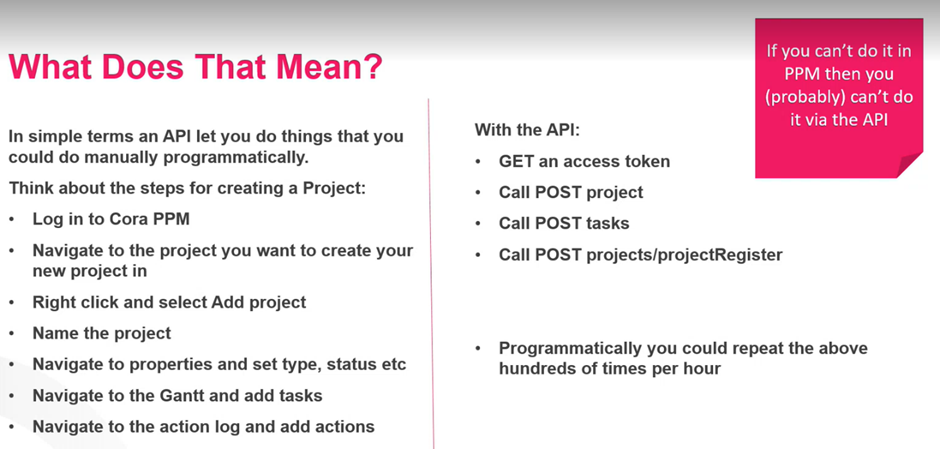
Important Misconceptions
- Our API can update other applications
- Swagger is NOT the API. Swagger is simply the tool to look at the end points of the API.
- Our API is purely for pushing and pulling data into PPM
- We do not have 2 APIs. We kind of have more than one. PV times - we have customers still using the old API. But as far as Cora are concerned, we only have one. Old one is legacy
- API is secure
RESTful and Endpoints
REST = Representational State Transfer. We do not need to know or care about this.
All this means is that it conforms to a set of architectural constraints part of which includes provision of end points to provide the ability to read, update and delete data.
Endpoints
GET - Gets data. Example = Get Project (Get data for one project)
PUT and POST - Update and insert data
Delete - To delete data. The Cora API has very few of these - on purpose
Before APIs, bespoke code would need to be configured in order for systems to be able to communicate. This was time consuming and costly, and there were many of them. If a products data base changed, then rework would need to be done.
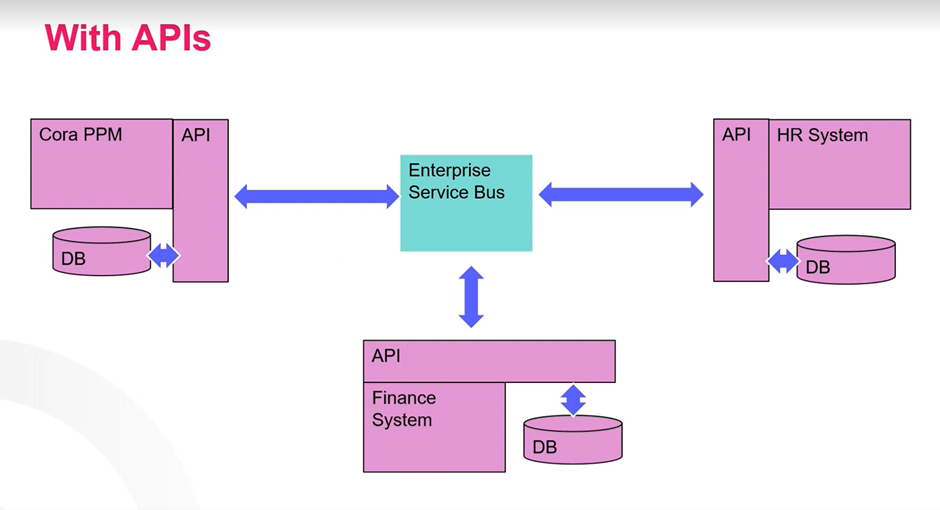
APIs protect against data base changes - it doesn't matter if Cora's data base changes, teh API will still be able to work with it, unlike in the past
SWAGGER
Swagger is NOT the API - it is a window into the endpoints. Developers and customers use swagger to see what endpoints are available.
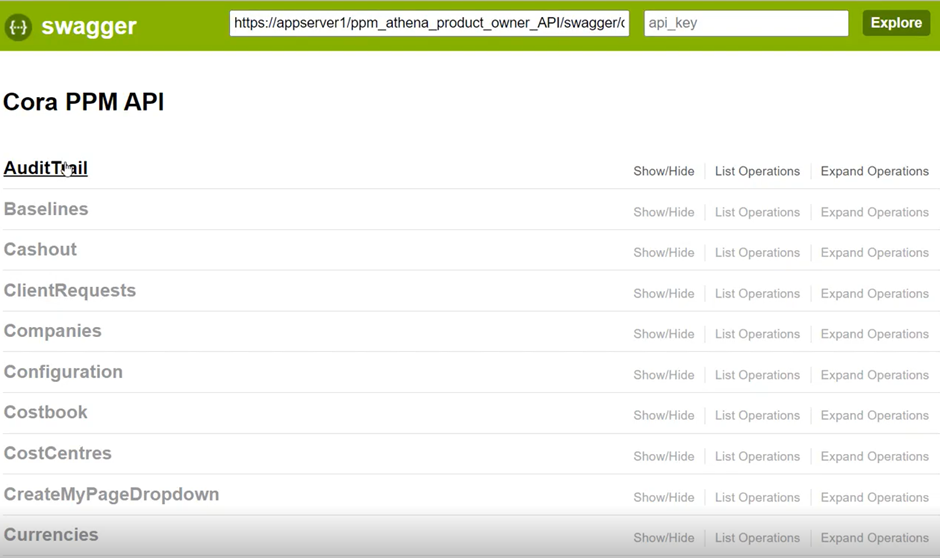
The list refers to the calls it can make.
Sometimes the API is tweaked for a specific customer. So you may have a customer with bespoke project data, the Get Project would be tweaked to pull in that additional data.
Get Projects Example
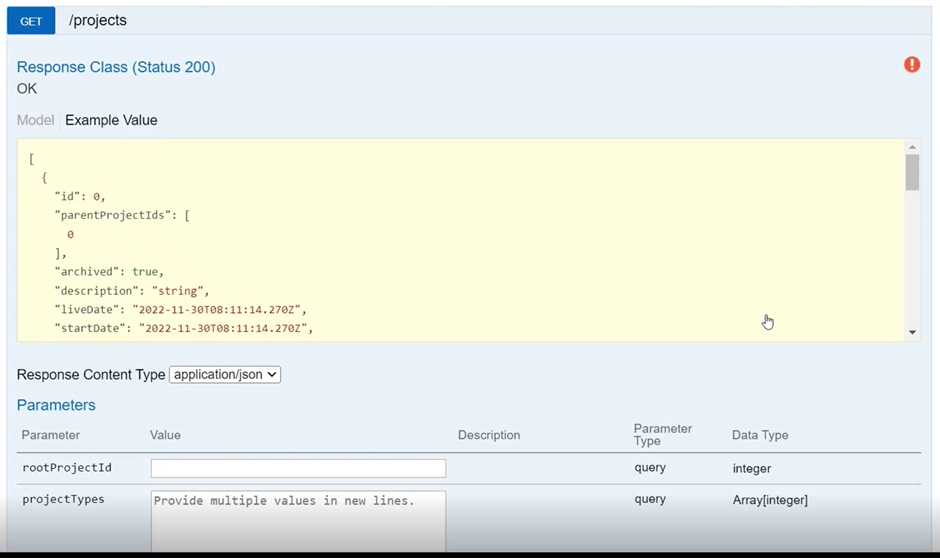
Written in JSON. Structure of messages sent out.
You pass in the ID and it brings back the list of projects.
Customer asks - can i use x endpoints? Check Swagger.
He sends that to the application via SEND and gets a response back;
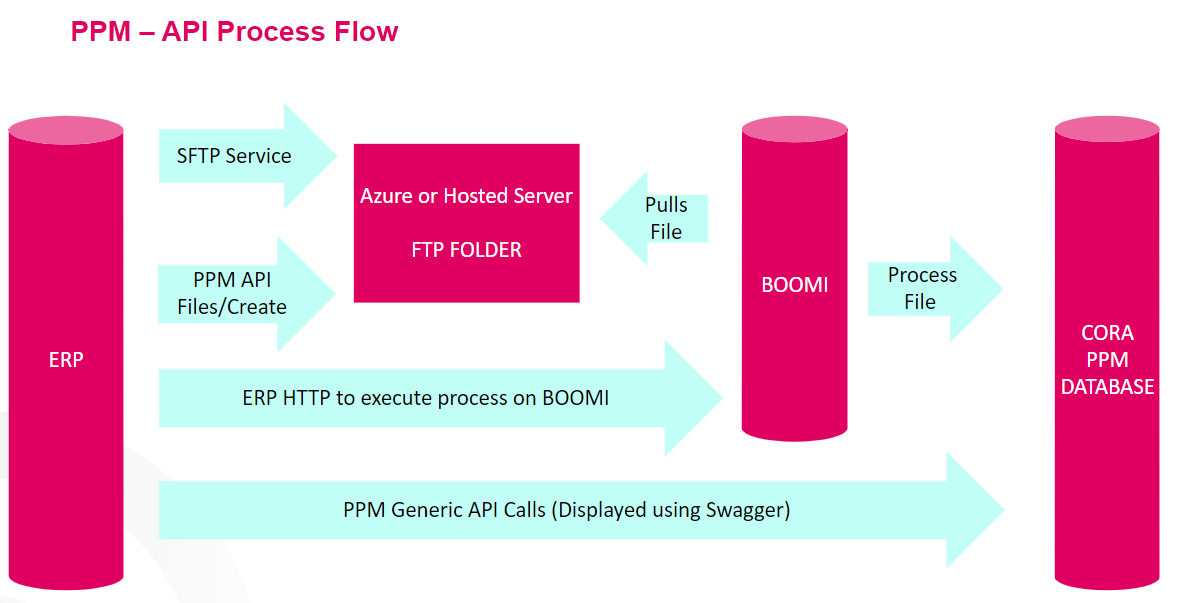
API Process Flow
Misc Tips
If you want to export financial data via API it must be APPROVED in new Enterprise Financials via a Workflow
Where to find the API administration UI
- Log in to Cora PPM as an Administrator.
- Navigate to Admin → System → API (the menu item will be labelled "Cora PPM API").
- The page Admin/Config_API.aspx↗ opens with a tab strip across the top.
Tabs in the API admin page
Tab | Purpose |
|---|---|
API Keys | Displays the read-only key and the update key. Use Recreate to generate new keys — warning: regenerating a key immediately invalidates all integrations using the old key. |
Documentation | Interactive "try it" reference for the legacy (v0.5) API surface. Groups endpoints by resource type with colour-coded HTTP verbs (blue=GET, green=POST, orange=PUT, red=DELETE). Each endpoint can be expanded to see parameters, then tested live from the browser. |
API Clients | Manage OAuth 2 client registrations (client ID, secret, allowed scopes) used by external systems that authenticate via the built-in IdentityServer. |
Personal Access Tokens | Create and revoke PATs for service accounts, automated scripts, or integrations that need long-lived credentials. |
Configuration | System-level API settings such as the base URL, sanitisation level, CORS allowed domains, signing certificate thumbprint, etc. |
Bulk Data Logs | View and audit the log of bulk data import operations performed through the API. |
Cora Hub Staging Configuration | Configure the Cora Hub (integration middleware) staging settings. |
Statistics | Opens a pop-up showing every registered route across all controllers, grouped by resource type, with HTTP method and path. |
New API Key | Generate a new API key for GovCon API access. |
How to call the API from external code
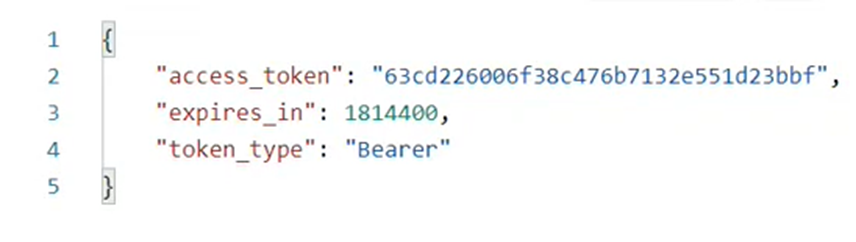
Step 1 – Get a bearer token (user-based OAuth flow)
POST {base_url}/identity/connect/token
Content-Type: application/x-www-form-urlencoded
grant_type=password&username={user}&password={pass}&client_id={client_id}&client_secret={secret}&scope=pv
Step 2 – Make API requests
GET {api_url}/projects?Limit=50&Offset=0
Authorization: Bearer {token}
Accept: application/json
Common query parameters (all list endpoints)
Parameter | Default | Effect |
|---|---|---|
| 500 | Number of records per page (max 500 without toggle) |
| 0 | Records to skip before returning |
| depends | Comma-separated field names; prefix with |
| all | Comma-separated field names to include in the response (field shaping) |
Reading paginated data in a loop
Check response headers after each call:
Pagination-Total— total number of matching recordsPagination-Returned— how many were in this batch- Increment
OffsetbyLimitand repeat untilOffset >= Total
Swagger/OpenAPI interactive documentation
The modern REST API ships with Swagger UI. Access it by browsing to the root URL of the API service (e.g., https://{your-server}/api/). It will redirect to swagger/ui/index. From there, click Authorize, enter your OAuth credentials, and you can browse and test every endpoint interactively.
Common pitfalls
- Model projects: Many write endpoints (
POST /projects,PUT /projects/{id},POST /tasks, etc.) will return400 Bad Requestif the target project is a model project. Always check that your project ID is not a model project. - Admin-only endpoints: Endpoints decorated with
[AdminOnly](such as creating users, importing financials, deleting organisations) will return403 Forbiddenif the authenticated user does not hold administrator rights in the system. - Circular references:
PUT /projects/{id}validates that moving a project to a new parent would not create a circular hierarchy. The call will fail with400 Bad Requestif it would. - Regenerating API keys: Clicking Recreate on the API Keys tab immediately breaks any running integration. Always coordinate with integration owners first.
- Limit cap: The default limit is capped at 500. Without the
ExceedApiDefaultLimitpermanent feature toggle turned on, requesting more than 500 records silently truncates to 500. - Period format: Financial/forecasting endpoints expect fiscal period values in
YYYYMMformat (e.g.,202406). Any other format is rejected with400 Bad Request.
Was this article helpful?
That’s Great!
Thank you for your feedback
Sorry! We couldn't be helpful
Thank you for your feedback
Feedback sent
We appreciate your effort and will try to fix the article