GovCon: Requirements (REQ) Register
The Requirements Register serves as the central repository for defining and managing all contractual and technical obligations. This includes Statement of Work (SOW) tasks, Statement of Objectives (SOO), Contract Data Requirements Lists (CDRLs), and flowdown requirements to subcontractors.
Toggles
Feature Toggle(s) | Permanent Toggle(s) |
NA | AlternativeHierarchies |
?️ Configuration (Admin)
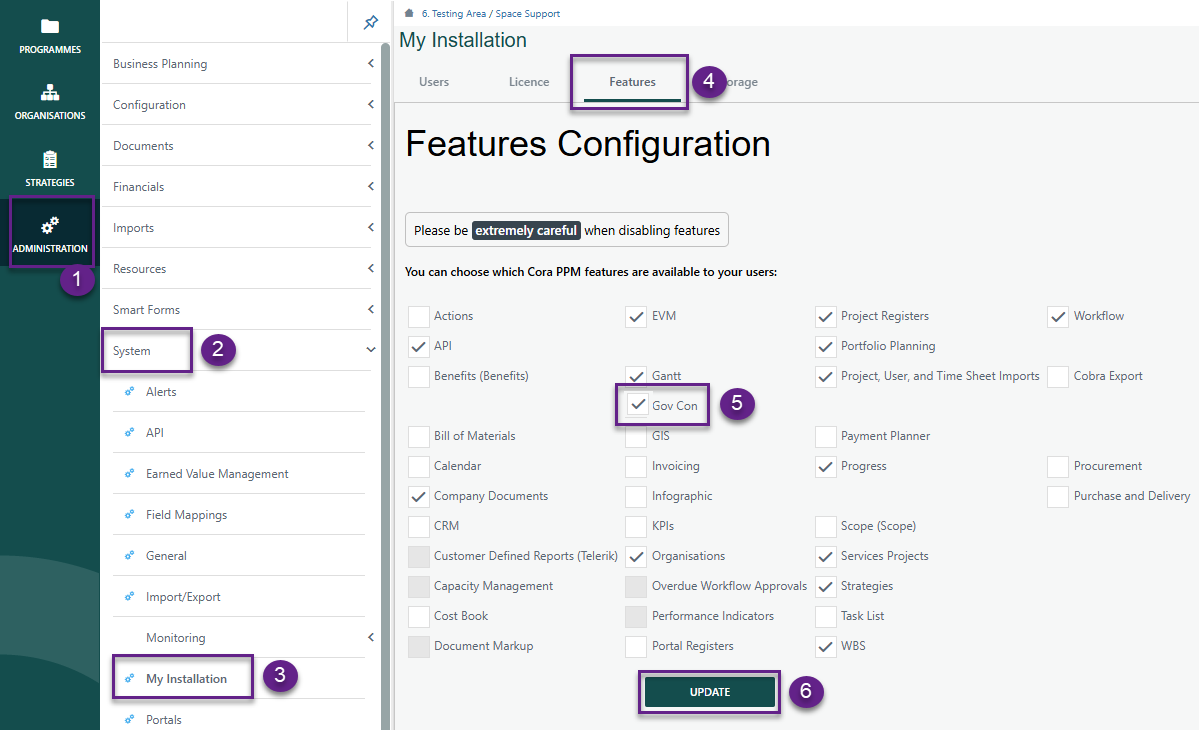
Administration > System > My Installation > Features
- Ensure GovCon is checked and click Update
Setting up Register
Navigate to Administration > Configuration > Project Registers.
- By clicking the GovCon feature under My Installation, the register, its fields, and corresponding dropdown lists are automatically created.
- Under Fields, both standard and additional Requirements system fields will be displayed. The system fields specific to the Requirements register are listed below.
Field Name | Type | Req'd | Source | Group |
Requirement ID | text | Y | User populates value based on SOW | Requirements |
Requirement Name | text | Y | User populates value | Requirements |
Requirement Type | single select custom list | Y | Dropdown Values: CLIN, CDRL, TRD, SOW, RFP | Requirements |
Revision Number | text | Y | User populates value | Requirements |
Requirement Date | date | Y | User populates the date from date selector | Requirements |
Requirement Level | single select custom list | Y | Dropdown Values: Project, Program | Requirements |
Requirement Description | text | Y | System field renamed | Requirements |
Requirement Owner | single select reference | Y | Link to: OBS register Field Name: OBS Role | Requirements |
Requirement Source of Request | single select custom list | Y | Dropdown Values: Subcontractor, Internal Management, DoE, DoD | Requirements |
Primary Requirement(Y/N) | Yes/No | N | Yes/No | Requirements |
Archive Requirement(Y/N) | Yes/No | N | Yes/No | Requirements |
SOW Reference | Text | N | System field | Requirements |
Last Date Updated | date | N | System field | Details |
Order | number | N | System field | Details |
Owned By | single select user list | N | System field | Details |
Raised By | single select user list | Y | System field | Details |
Raised Date | date | Y | System field | Details |
Status | single select status list | Y | System field | Details |
Target Date | date | N | System field | Details |
Parent ID | single select register record | N | System field | Details |
Level | calculated Field (Integer) | Y | System field | Details |
- Additional fields can be added per the customers requirements.
- Once completed, click Save.
Note: The dropdown list for system Requirements fields is prepopulated and required. However, Admins can modify existing values or add new ones as needed.
Requirement Type | Requirement Level | Requirement Source of Request |
CLIN | Project | Subcontractor |
CDRL | Program | Internal Management |
TRD | DoE | |
SOW | DoD | |
RFP |
Reminder: Be sure to add your new register to the project tool bar.
Configuration Suggestion: Enable the ability to “Include in Copy Project” for users to be able to copy this register content from one project to another.
Requirements Register is built on Cora's native Register functionality. See the general Register articles for further capabilities.
Was this article helpful?
That’s Great!
Thank you for your feedback
Sorry! We couldn't be helpful
Thank you for your feedback
Feedback sent
We appreciate your effort and will try to fix the article