GovCon: Current Period Corrections (CPC) Register
A Current Period Corrections (CPC) log is a vital governance tool that ensures financial integrity and audit readiness for organizations managing complex projects, particularly in the GovCon and A&D sectors. By providing a transparent, defensible audit trail for real-time data adjustments, it allows teams to correct mischarges and accounting lags without distorting historical performance trends or triggering "red flags" during DCAA audits. Ultimately, the CPC log transforms reporting from a reactive headache into a reliable strategic asset, giving executive leadership the confidence that their project metrics—and their compliance—are both accurate and airtight
Toggles
Feature Toggle(s) | Permanent Toggle(s) |
NA | AlternativeHierarchies |
?️ Configuration (Admin)
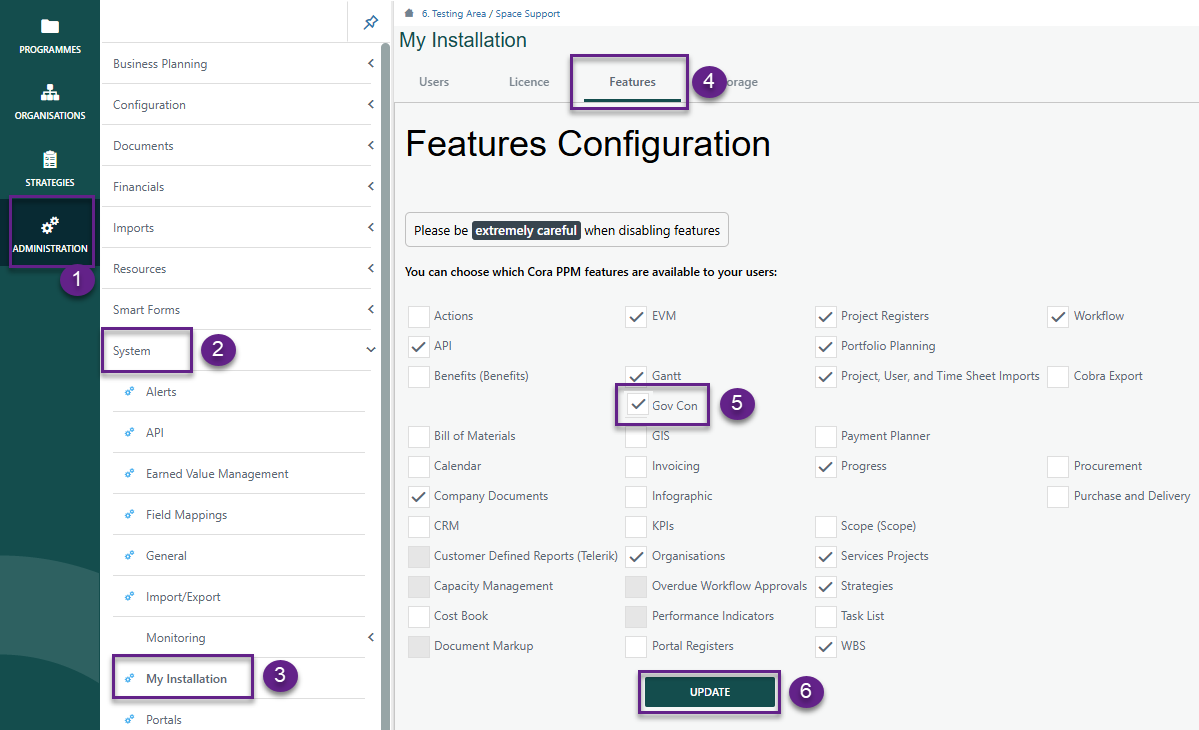
Administration > System > My Installation > Features
- Ensure GovCon is checked and click Update
Setting up Register
Navigate to Administration > Configuration > Project Registers.
- By clicking the GovCon feature under My Installation, the register, its fields, and corresponding dropdown lists are automatically created.
- Under Fields, both standard and additional Requirements system fields will be displayed. The system fields specific to the Current Period Corrections register are listed below.
Field Name | Type | Req'd | Source | Group |
CPC ID | Hierarchy | Y | Hierarchy field type | Current Period Corrections |
Description | Text | Y | Existing out of box Description field | Current Period Corrections |
Justification | Text | N | Display Height: 2 | Current Period Corrections |
Control Account | Single Select Reference Dropdown | Y | Source: Register | Current Period Corrections |
Work Package | Single Select Reference Dropdown | Y | Source: Register | Current Period Corrections |
Type | Single select custom list | N | Error Correction | Current Period Corrections |
Account Code | Single select system data | Y | single select system data field | Current Period Corrections |
EOC | Text | N | Populated based on the Account Code selected in the Account Code field. Option selected in the Element of Cost field on an Account Code: under Admin | Financials | Codes | Account | Element of Cost field Text populated from db query | Current Period Corrections |
Resource | Multi select system data | N | multi select system data field | Current Period Corrections |
Amount | Numeric | N | Numeric | Current Period Corrections |
Hours | Numeric | N | Current Period Corrections | |
Transaction Date | Date | N | Existing out of box field - Rename Target Date | Current Period Corrections |
Effective Date | Date | N | Current Period Corrections | |
Raised By | Single select user list | Y | Existing out of box field | Details |
Raised Date | Date | Y | Existing out of box field | |
Owned By | Single select user list | Y | Existing out of box field | Details |
Status | Single select status list | Y | Existing out of box field | Details |
Last Date Updated | Date | N | Existing out of box field | Details |
Order | Numeric | Y | Existing out of box field | Details |
Parent Id | Single select register record | N | Existing out of box field | Details |
Level | Calculated field (integer) | Y | Existing out of box field | Details |
- Additional fields can be added per the customers requirements.
- Once completed, click Save.
Note: The dropdown list for system field Type is prepopulated and fields are not required. However, Admins can modify existing values or add new ones as needed. Control Accounts, Work Package, Account Code, Resource and EOC are dropdown lists that are populated based on the WBS Register or system data field (account code, skill, EOC).
Current Period Corrections |
Error Correction |
Accounting Adjustment |
Customer Directed Change |
Management Directed Change |
PMB Integrity Improvement |
Reminder: Be sure to add your new register to the project tool bar.
? Items to be aware of (Gotchas!)
Item | Admin, End User, or Both |
|---|---|
Current Period Corrections Register references the WBS Register, therefore WBS Register is required for CPC. | Both |
Current Period Corrections Register references the Element of Cost, Skills and Account Codes system fields therefore is required and need to be setup before enabling Register for use. | Both |
Upcoming Enhancement: Future releases will update the Work Package field to be optional rather than a mandatory requirement. | Both |
Was this article helpful?
That’s Great!
Thank you for your feedback
Sorry! We couldn't be helpful
Thank you for your feedback
Feedback sent
We appreciate your effort and will try to fix the article