GovCon: Estimated Actuals (EA) Register
Estimated Actual (EA) costs or accruals of significant material items for which performance has been claimed but invoice payment has not been recorded in the accounting system. All estimated actuals must be based on documented, verifiable information and only apply to current period.
Toggles
Feature Toggle(s) | Permanent Toggle(s) |
NA | AlternativeHierarchies |
?️ Configuration (Admin)
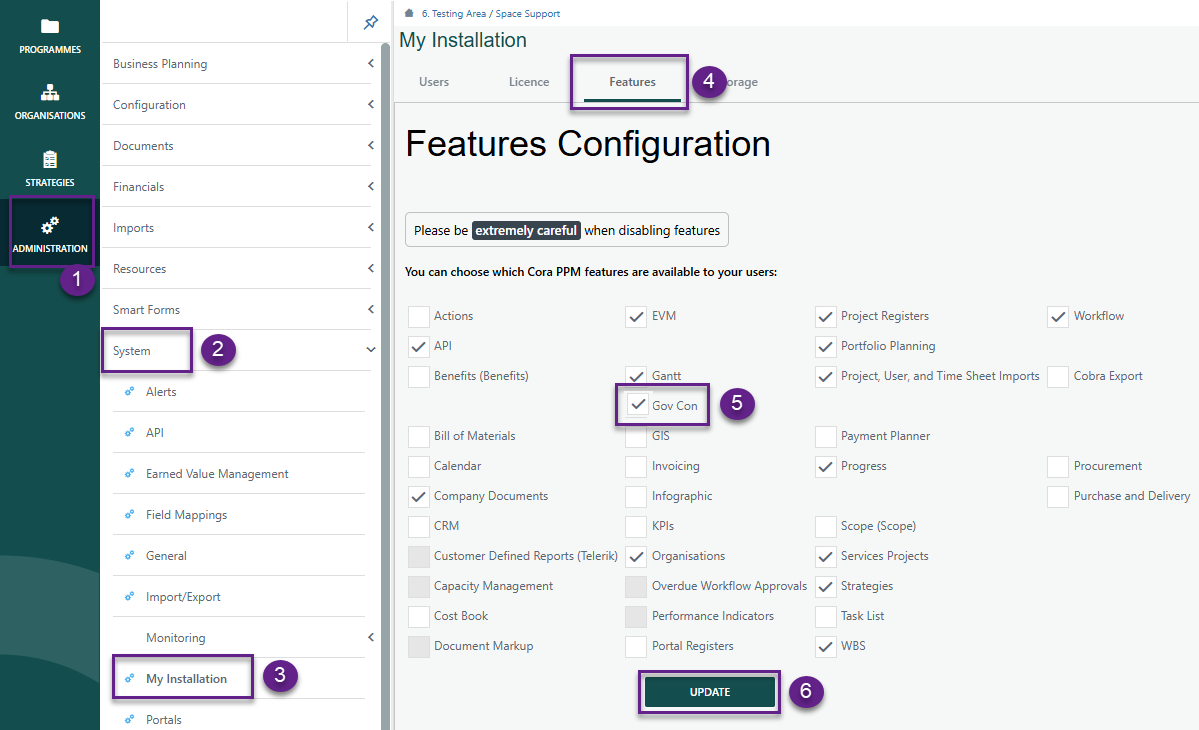
Administration > System > My Installation > Features
- Ensure GovCon is checked and click Update
Setting up Register
Navigate to Administration > Configuration > Project Registers.
- By clicking the GovCon feature under My Installation, the register, its fields, and corresponding dropdown lists are automatically created.
- Under Fields, both standard and additional Requirements system fields will be displayed. The system fields specific to the Estimated Actuals register are listed below.
Field Name | Type | Req'd | Source | Group |
EA Code | hierarchy | Y | Hierarchy field type | Estimated Actuals |
EA Type | single select custom list | N | EA Type dropdown | Estimated Actuals |
Description | text | Y | existing out of box Description field | Estimated Actuals |
Justification | text | N | Display Height: 2 | Estimated Actuals |
Control Account | Single Select Reference Dropdown | Y | Source: Register | Estimated Actuals |
Work Package | Single Select Reference Dropdown | Y | Source: Register | Estimated Actuals |
Resource | multi select system data | N | multi select system data field | Estimated Actuals |
Account Code | single select system data | Y | single select system data field | Estimated Actuals |
Element of Cost | text | N | Populated based on the Account Code selected in the Account Code field. | Estimated Actuals |
Estimated Cost | numeric | N | Estimated Actuals | |
Actual Cost | numeric | N | Estimated Actuals | |
Quantity | numeric | N | Estimated Actuals | |
Source | single select custom list | N | EA Source dropdown | Estimated Actuals |
Reference Info | text | N | Display Height: 2 | Estimated Actuals |
Variance | numeric | N | Estimated Actuals | |
Explanation | text | N | Display Height: 2 | Estimated Actuals |
Corrections | text | N | Display Height: 2 | Estimated Actuals |
Effective Start Date | date | N | existing out of box field - Rename Target Date | Estimated Actuals |
Effective End Date | date | N | Estimated Actuals | |
Raised By | single select user list | Y | existing out of box field | Details |
Raised Date | date | Y | existing out of box field | Details |
Owned By | single select user list | Y | existing out of box field | Details |
Status | single select status list | Y | existing out of box field | Details |
Last Date Updated | date | N | existing out of box field | Details |
Order | numeric | Y | existing out of box field | Details |
Parent Id | single select register record | N | existing out of box field | Details |
Level | calculated field (integer) | Y | existing out of box field | Details |
- Additional fields can be added per the customers requirements.
- Once completed, click Save.
Note: The dropdown list for system fields EA Type & Source are prepopulated and fields are required. However, Admins can modify existing values or add new ones as needed.
EA Type | EA Source |
Materials | Purchase Order |
Subcontracts | Invoice |
Quote | |
Work Order |
Reminder: Be sure to add your new register to the project tool bar.
? Items to be aware of (Gotchas!)
Item | Admin, End User, or Both |
|---|---|
Estimated Actual Register references the WBS Register, therefore is required. | Both |
WBS Register needs to be created before Estimated Actuals due to dropdowns on register that reference WBS Register. | Both |
Upcoming Enhancement: Future releases will update the Work Package field to be optional rather than a mandatory requirement as well the Quantity field will be removed. | Both |
Was this article helpful?
That’s Great!
Thank you for your feedback
Sorry! We couldn't be helpful
Thank you for your feedback
Feedback sent
We appreciate your effort and will try to fix the article