Register: Used in Financials Fields
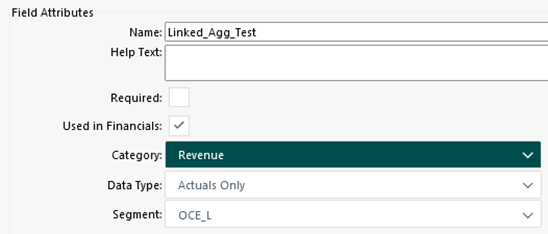
Checking the Used in Financials field attribute checkbox enables data to flow from Register fields (Numeric, Calculated Field, or Linked Register Aggregate types) to the Advanced Financials (aka Forecasting) screen and underlying data structures. Configuration of the Used in Financials register field functionality includes definition of the following
- Category: Cost, Revenue, or Billings
- Data Type: Actuals Only, Forecast Only, Actuals & Forecast
- Segment: A listing of the Segment columns for a particular Cora PPM configuration.
The example below Total Cost field (type Linked Register Aggregate) leverages the child item links to identify the records to total for each parent register record.
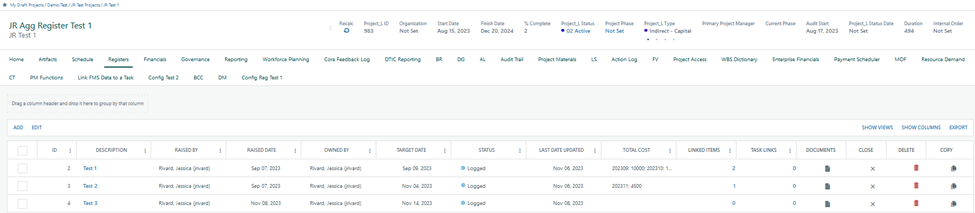
In this instance, the values from the linked Child Items related to each Parent Register Record are segmented by month in a string aggregate within the Total Cost column due to the Timephased check in the Register field configuration.
ID | Description | Linked Items | Total Cost |
2 | Test 1 | 2 | 202309: 10000; 202310: 17000 |
3 | Test 2 | 1 | 202311: 4500 |
4 | Test 3 | 0 |
Load from Registers pulls the register aggregate values designated to Used in Financials for a given project. The register total values and register aggregate values (upon expansion) appear under the Register Billings, Register Revenue, or Register Cost categories on the Advance Financials sheet.
Was this article helpful?
That’s Great!
Thank you for your feedback
Sorry! We couldn't be helpful
Thank you for your feedback
Feedback sent
We appreciate your effort and will try to fix the article