GovCon: Single Point Adjustment (SPA) Register
A Single Point Adjustment (SPA) log provides critical governance by documenting the formal "reset" of a project's performance metrics, ensuring that major baseline realignments remain transparent and defensible to stakeholders and auditors like the Defense Contract Audit Agency (DCAA). In complex environments where historical variances become unrecoverable or scope shifts render old data irrelevant, the SPA log captures the justification for zeroing out cumulative cost and schedule variances to establish a realistic path forward. This prevents the appearance of unauthorized data manipulation while restoring the utility of performance metrics, ultimately allowing leadership to drive future outcomes based on current reality rather than being obscured by past performance "noise."
Toggles
Feature Toggle(s) | Permanent Toggle(s) |
NA | AlternativeHierarchies |
?️ Configuration (Admin)
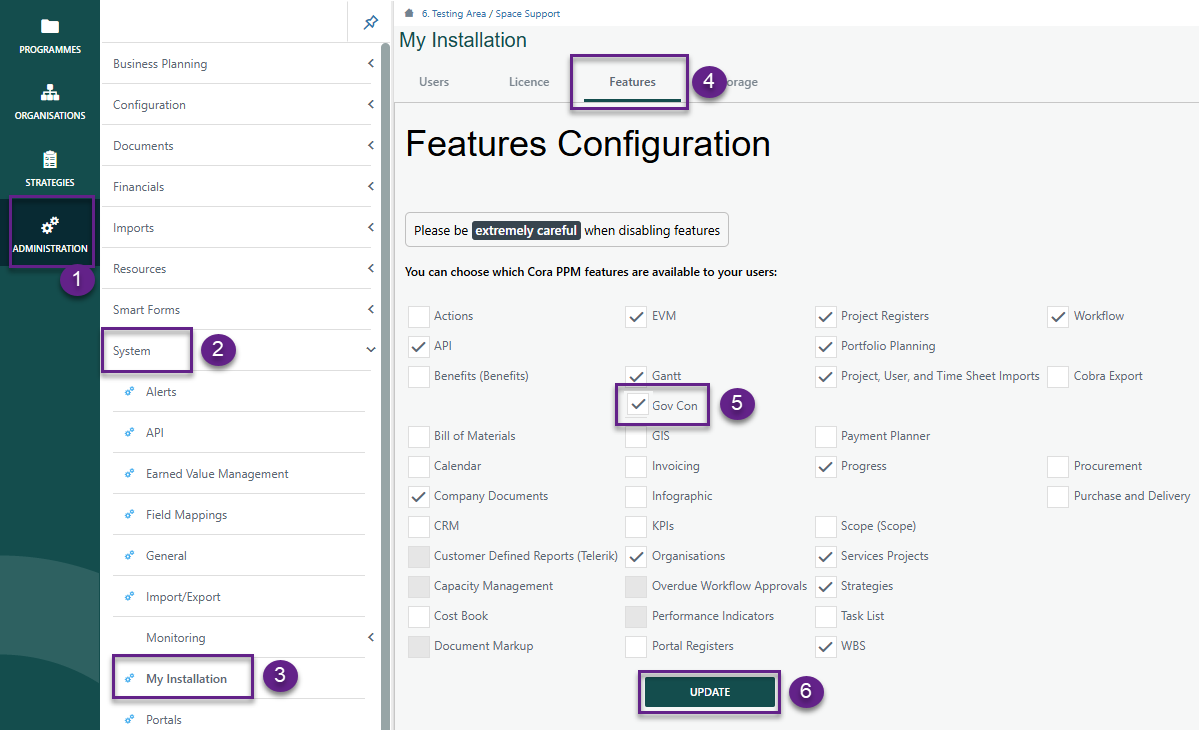
Administration > System > My Installation > Features
- Ensure GovCon is checked and click Update
Setting up Register
Navigate to Administration > Configuration > Project Registers.
- By clicking the GovCon feature under My Installation, the register, its fields, and corresponding dropdown lists are automatically created.
- Under Fields, both standard and additional Requirements system fields will be displayed. The system fields specific to the Single Point Adjustment register are listed below.
Field Name | Type | Req'd | Source | Group |
SPA Code | hierarchy | Y | Hierarchy field type | Single Point Adjustment |
Description | text | Y | Existing out of box Description field | Single Point Adjustment |
Approach | single select multi-column custom list | Y | Single Point Adjustment | |
Status Date | Date | Y | Single Point Adjustment | |
CA Code | Single Select Reference Dropdown | Y | Source: Register | Single Point Adjustment |
WP Code | Single Select Reference Dropdown | N | Source: Register | Single Point Adjustment |
Replan WP Code | Single Select Reference Dropdown | N | Source: Register | Single Point Adjustment |
Account Code | single select system data | Y | Single select system data field | Single Point Adjustment |
EOC | text | N | EoC from selected Account Code - text popoulated from db query | Single Point Adjustment |
Skill | multi select system data | Y | multi select system data field | Single Point Adjustment |
Current ACWP | Numeric | Y | Single Point Adjustment | |
Current BCWP | Numeric | Y | Single Point Adjustment | |
Current BCWS | Numeric | Y | Single Point Adjustment | |
Adjusted BCWP | Numeric | N | Single Point Adjustment | |
Adjusted BCWS | Numeric | N | Single Point Adjustment | |
Justification | text | Y | Display Height: 2 | Single Point Adjustment |
BCC Reference | Single Select Reference Dropdown | N | Source: Register | Single Point Adjustment |
Raised By | single select user list | Y | Existing out of box field | Details |
Raised Date | date | Y | Existing out of box field | Details |
Owned By | single select user list | Y | Existing out of box field | Details |
Target Date | date | N | Existing out of box field | Details |
Status | single select status list | Y | Existing out of box field | Details |
LastDateUpdated | date | N | Existing out of box field | Details |
Order | numeric | Y | Existing out of box field | Details |
Parent Id | single select register record | N | Existing out of box field | Details |
Level | calculated field (integer) | Y | Existing out of box field | Details |
- Additional fields can be added per the customers requirements.
- Once completed, click Save.
Note: The dropdown list for CA Code, WP Code, Replan WP Code, Account Code, EOC, Skill and BCC Reference are dropdown lists that are populated based on the WBS Register, Baseline Change Control Register or system data field (account code, skill, EOC).
Reminder: Be sure to add your new register to the project tool bar.
? Items to be aware of (Gotchas!)
Item | Admin, End User, or Both |
|---|---|
Single Point Adjustment Register references the WBS Register and Baseline Change Control Register, therefore is required. | Both |
Single Point Adjustment Register references the Element of Cost, Skills and Account Codes system fields therefore is required and need to be setup before enabling Register for use. | Both |
Was this article helpful?
That’s Great!
Thank you for your feedback
Sorry! We couldn't be helpful
Thank you for your feedback
Feedback sent
We appreciate your effort and will try to fix the article