Cora PPM Connectivity and Performance Guide
Direct Internet Access
If your organisation routes internet traffic through a proxy server, this can slow down your connection to Cora PPM. The steps below explain how your IT team can address this.
To help minimise latency and reduce unnecessary overhead, Cora recommends establishing a direct connection to the internet from the client machine wherever possible. Routing traffic through a proxy server can introduce additional overhead that may negatively impact client performance by increasing network latency. As all Cora PPM traffic is encrypted, proxy servers are unable to inspect or cache content in transit, meaning the typical performance benefits of proxying do not apply. Where a direct connection is not achievable, some reduction in performance should be expected as a result of proxy overhead.
The decision to route traffic directly is one for your organisation's IT and security teams to make in line with your own policies. If a direct connection is achievable, this can typically be configured through Proxy Auto-Config (PAC) files in the web browser, or by configuring your proxy server to allow direct passthrough for Cora PPM traffic.
We recommend sharing your organisation's specific URLs, public IP addresses, and IP ranges with your local IT systems administration team so they can assess the best connectivity approach for your environment. These details can also be used for whitelisting purposes at the firewall or proxy level.
To obtain your organisation's public IP addresses, and IP ranges, please raise a ticket with Cora Customer Support.
Test your connection speed
A good indicator of your current connectivity performance can be found via our service connectivity test tool, accessible when logged in as an administrator at Administration > System > General. The option is in the bottom right-hand corner of the screen.
The tool is useful as a guide to compare connectivity from different locations and profiles. Please ensure you test from the machine connected in the office, from a remote machine, and from a personal device if your organisation's policies permit. This will enable effective troubleshooting of connectivity issues.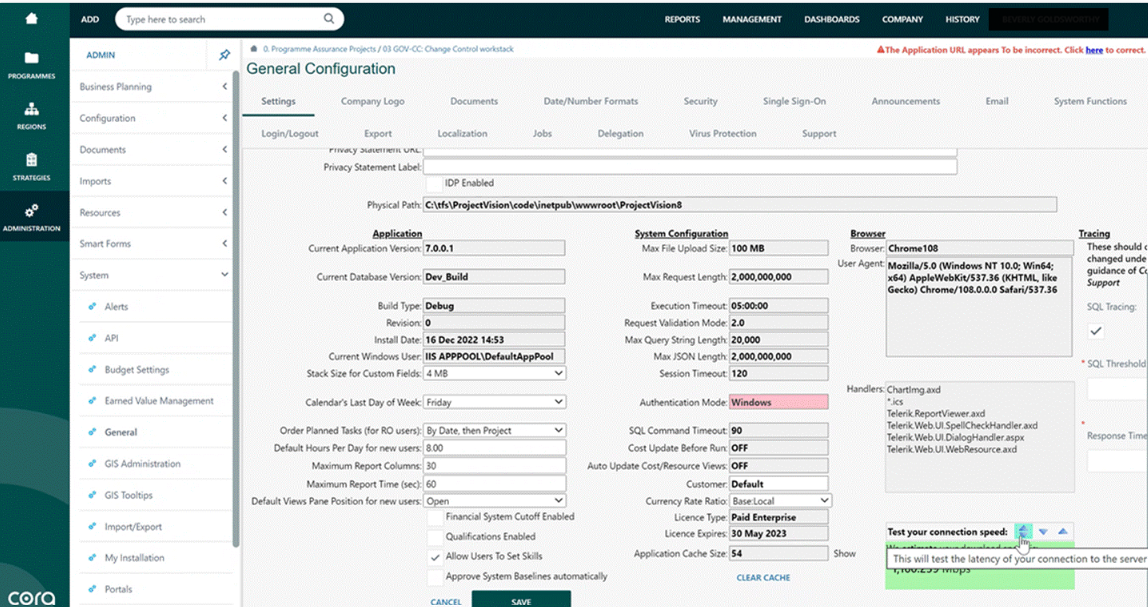
If your speeds align to the recommended speeds outlined below and you feel this may need to be logged for further investigation by Cora, we would recommend providing a .har file in addition to a video, steps to provide a .har file are outlined here.
Recommended Speeds for Cora PPM
| Metric | Minimum | Recommended |
|---|---|---|
| Latency | < 150 ms | < 100 ms |
| Download | > 5 Mbps | > 10 Mbps |
| Upload | > 2 Mbps | > 5 Mbps |
If your connection speeds fall outside the minimum thresholds, you are likely to experience performance issues within Cora PPM as a result. We recommend sharing these figures with your IT team as a reference point when investigating connectivity concerns.
Was this article helpful?
That’s Great!
Thank you for your feedback
Sorry! We couldn't be helpful
Thank you for your feedback
Feedback sent
We appreciate your effort and will try to fix the article