Project Registers: Administration - Gantt Columns

When a project manager or team member opens the Gantt chart view in Cora PPM, they see task bars representing the project schedule. Cora PPM also allows custom data from Project Registers to appear as additional information columns directly alongside each task bar in the Gantt — these are called Gantt Columns.
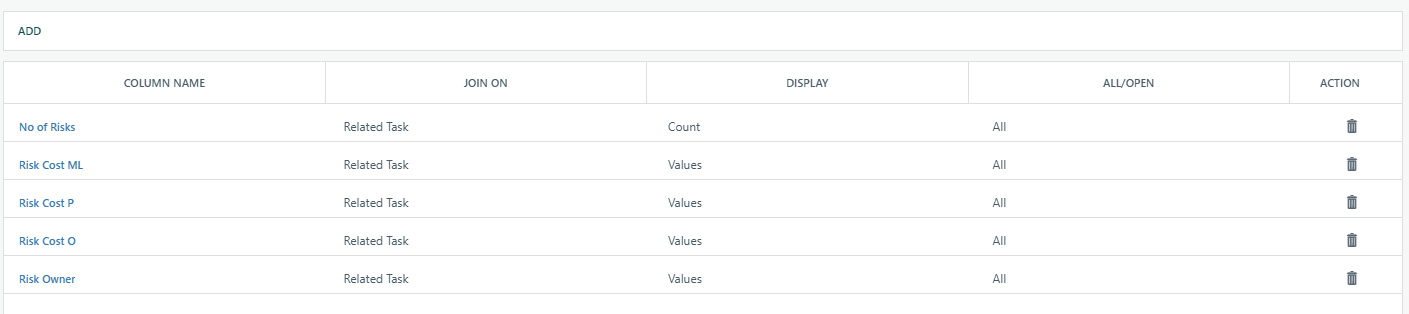
Gantt Column bridges a project register (e.g. a Risk Register, Action Register, or any custom register) with the Gantt chart by counting or displaying register entries that are associated with Gantt tasks. For each task in the Gantt, the configured column shows either:
- A count of how many register records are linked to that task, or
- The value of a specific field from linked register records (displayed as a comma-separated list if multiple records are linked).
Why would someone use Gantt Columns?
They exist so project teams can see important register data contextually within the schedule. Instead of switching back and forth between the Gantt and a separate register view, a planner can immediately see — on each task row — how many open risks or actions are associated with that task, or what the value of a key field (e.g. "Impact Rating") is across all linked items. This is particularly useful for:
- Quickly spotting tasks with many open risks or outstanding actions.
- Surfacing the current status of linked register entries at a glance without opening them.
- Supporting governance reviews where the schedule and register data need to be viewed together.
How does the join/link work?
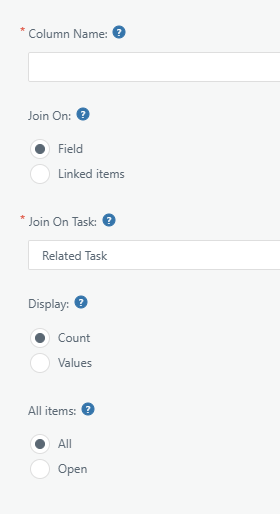
Each Gantt Column is configured with a Join On mechanism is how the register records are associated with Gantt tasks. There are two modes:
- Field: A field of type "Task Field" (e.g. a SingleSelectTaskList or MultiSelectTaskList field) already exists on the register; the Gantt Column uses the task IDs stored in that field to create the join between the register record and the task.
- Linked Items: The register uses the existing "Linked Items" mechanism, where register entries have been linked to tasks directly; the Gantt Column shows data from those linked relationships.
The column also controls whether it shows data from All register entries linked to each task, or only Open entries (i.e. those whose status is not "Closed").
Scope and availability:
- Gantt Columns are configured per register, so a single project can have multiple Gantt Columns sourced from different registers.
- Once configured at the admin level, the columns appear globally across all projects that use that register's Gantt data. Project-level display toggling (show/hide specific columns) is a separate per-project/per-user control on the Gantt itself.
- A field used as a Gantt Column cannot be deleted from the register until the Gantt Column configuration is removed — the system enforces this to protect the data integrity of the linkage.
Was this article helpful?
That’s Great!
Thank you for your feedback
Sorry! We couldn't be helpful
Thank you for your feedback
Feedback sent
We appreciate your effort and will try to fix the article