Cora PPM's multicurrency handling is a system-wide feature that allows the application to manage financial data across multiple currencies simultaneously. At its core, the system maintains a single base currency (the organisation's primary reporting currency) and any number of local currencies, each with time-stamped exchange rates.
When multicurrency is enabled, financial figures stored in a project's local currency are automatically converted to the base currency for cross-project reporting and register calculations. The feature also supports flexible FX rate selection at the project level and keeps full audit trails for every rate and currency change.
Enabling Multicurrency
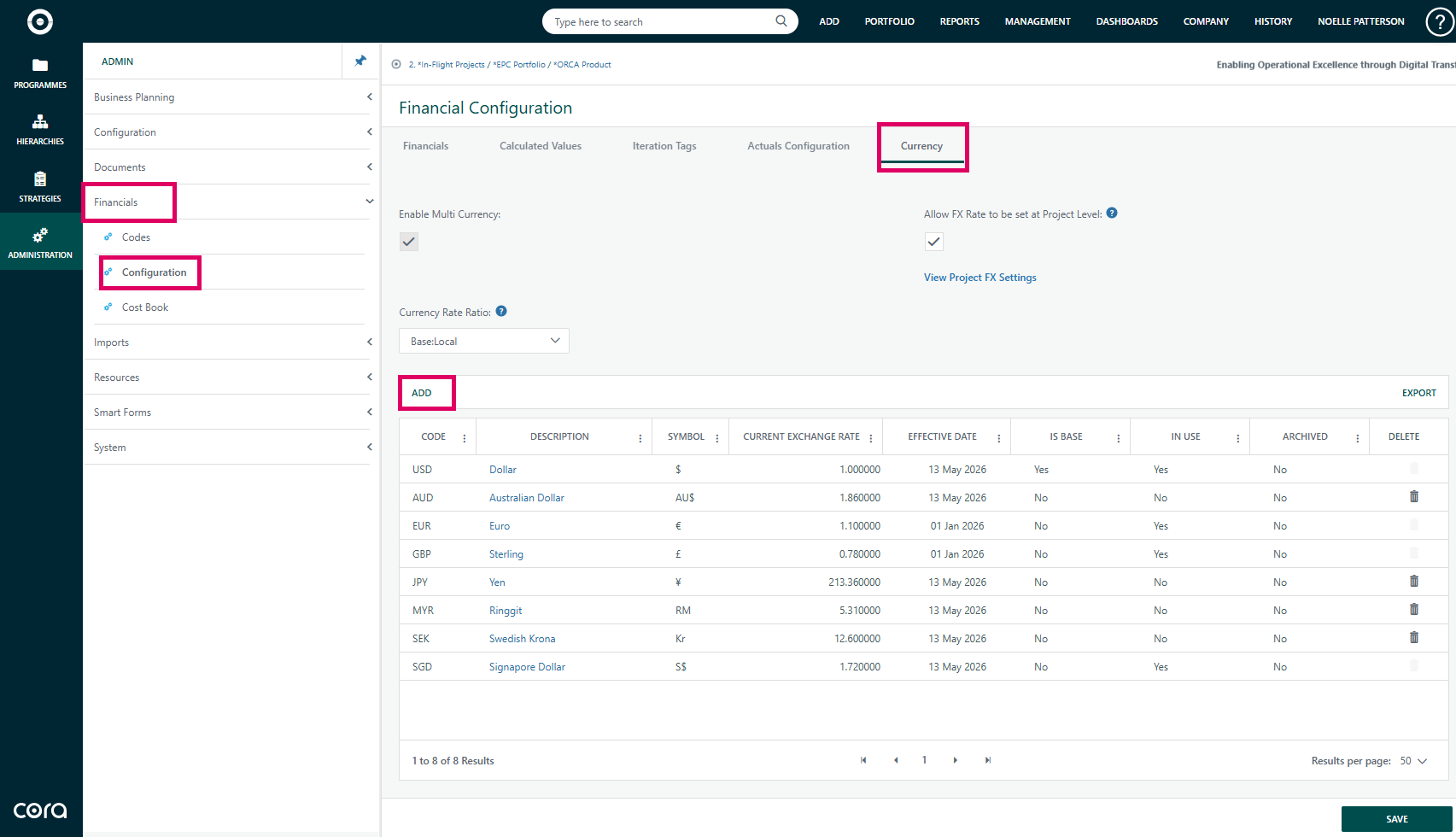
- Navigate to Admin → Financial Configuration → Currency tab.
- Check the Enable MultiCurrency toggle. This immediately enables the currency management grid and the project-level FX rate settings panel.
- Once enabled, the Add button appears in the currency grid so new currencies can be created.
- Disabling multicurrency is only possible when only one currency exists in the system.
Gotchas: Disabling multicurrency is restricted once multiple currencies exist in the system.
Managing Currencies (System Level)
From the Currency tab, each row in the grid represents a currency with its code, description, and latest rate.
Action | Details |
|---|---|
Open Currency Details | Click a currency description to open the Currency Details popup. |
Set Core Fields | Set the Code (converted to uppercase, must be unique), Description, and Symbol. |
Set Base Currency | Mark a currency as the Base currency. Only one can be the base at a time; the base currency cannot be archived. |
Archive Currency | Archive a currency to hide it from project dropdowns without deleting it. |
Manage Exchange Rates | Manage the Exchange Rate history. Each rate entry requires a unique effective date per currency and accepts rates between 0.000001 and 10,000,000,000. |
Export Rate History | Exporting to Excel is available from the grid toolbar. You must leave edit mode before exporting. |
Delete Currency | A currency cannot be deleted if it is in use by any project; the delete button will be disabled with a tooltip explaining why. |
Exchange Rate Direction Setting
Under the Currency tab there is a Currency Rate Ratio dropdown:
Setting | Description |
|---|---|
Standard (Default) | Rates express how much local currency one unit of the base currency buys (Base:Local). |
Inverted | Rates express how much base currency one unit of the local currency buys (Local:Base). |
This setting affects how rates are displayed in tooltips and how the ProjectFxRateService.ConvertToBaseCurrency method divides or multiplies.
Enabling Project-Level FX Rates
From the same Currency tab, toggle Enable Project Level FX Rate to allow individual projects to override the system-wide current rate.
Setting Currency at the Project Level
- Open a project and navigate to its Properties → Currency section.
- Select the Local Currency for the project from the dropdown. Archived currencies are hidden unless the project already uses them.
- If multicurrency is enabled and the selected currency differs from the base, choose one of the available Project FX Rate options.
- Changing the project currency triggers a confirmation warning that existing financial data is reinterpreted in the new currency.
- Saving triggers background jobs to recalculate base-currency values for registers and custom details.
Project FX Rate Option | How It Works |
|---|---|
Current FX Rate | Always uses the most recent rate for that currency; the effective date is shown. |
Project-Specific FX Rate | Enter a fixed rate in the text box that appears. A tooltip reminds you of the direction convention. |
Period-Specific FX Rate | Select from the list of historical rate entries for that currency. |
Gotchas: Changing the project currency reinterprets existing financial data in the new currency.
Expenses and Local Currency
When adding or editing an expense via Add Expense:
- A Local Currency dropdown lists all non-archived currencies.
- If the timesheet configuration has exchange rates enabled and “calculate amount from exchange rate” is on, selecting a non-base currency locks the base-amount field and requires an exchange rate entry.
- The base-currency amount is shown as “Amount In [Base Currency Description]”.
Tips and Gotchas
Topic | Details |
|---|---|
Saving Currency Changes | Saving currency changes in the Details popup is a two-step operation. Rate changes made in the grid are held in |
Base Currency Exchange Rates | Base currency exchange rates are not shown. The rate grid panel is hidden for the base currency because its rate is always 1. |
Honeywell Customers | Honeywell customers have a specialised 7-decimal precision for rates and the currency code may be read-only if linked to Honeywell project data. |
Background Jobs |
|
Archived Projects | Archived projects use the exchange rate that was effective at the time of archiving rather than the current rate. |
Was this article helpful?
That’s Great!
Thank you for your feedback
Sorry! We couldn't be helpful
Thank you for your feedback
Feedback sent
We appreciate your effort and will try to fix the article