GovCon: Variances
Earned Value variance refers to the difference between planned performance and actual performance on a project, measured in terms of cost or schedule. It’s a key component of Earned Value Management (EVM) and helps assess how well a project is adhering to its budget and timeline
Toggles
Note: To use EVM in Cora, you must enable both the Baseline and Rate Matrix functionality, as EVM cannot function properly without them. All required toggles for EVM, including Baselines and Rate Matrix, are listed below.
Feature Toggle(s) | Permanent Toggle(s) |
EVM | |
144924_Set_EV_Percent_Complete_to_100 | |
Baselines | |
100008_Financial_Baseline_Comparison_MVP | Updated_Baselines |
Rate Matrix | |
114927_Add_Filter_functionality_to_Rate_Matrix_Gri | |
Schedule | |
141598_Hide_Expected_Date_on_Materials | KanbanBoard |
?️ Configuration (Admin)
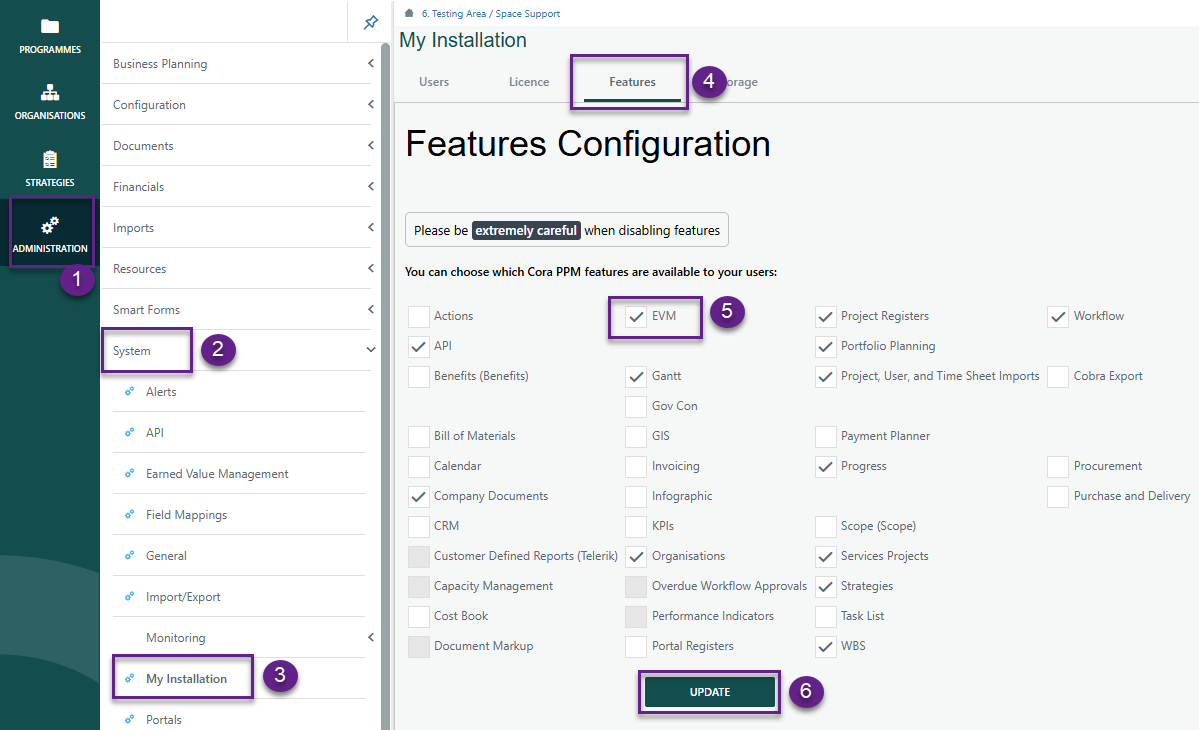
Administration > System > My Installation > Features
Ensure EVM is checked and click Update
- Go to Administration > System > Earned Value Management
Select the Variances tab.
- Click Add to create a new variance reporting rule.
In the pop-up window, configure the following fields for each rule:
- Name – A unique identifier for the variance rule
- Variance Type – Choose the applicable variance category
- Calculation Type – Select how the variance will be calculated
- Decimal Place – Set the number of decimal places for values
- Percentage or Currency – Define the output format
- Condition – Specify the logic for the variance condition
- Thresholds – Enter the threshold values that will trigger the rule
- Click Save after setting each rule.
- Repeat the process until all required variance reporting rules are added.
- EV Attributes that are available in Conditions:
ACWP Cost | BCWR Cumulative Hours | ETC Hours |
ACWP Hours | BCWR Cumulative Cost | ETC Cost |
ACWP Cumulative Hours | BCWS Hours | BAC Hours |
ACWP Cumulative Cost | BCWS Cost | BAC Cost |
BCWP Hours | BCWS Cumulative Hours | EAC Hours |
BCWP Cost | BCWS Cumulative Cost | EAC Cost |
BCWP Cumulative Cost |
Recommended Conditions:
Cost Variance (CV) | Formula | Schedule Variance (SV) | Formula |
|---|---|---|---|
$ | BCWP Cost-ACWP Cost | Hours | BCWP Hours- ACWP Hours |
% | ((BCWP Cost-ACWP Cost)/BCWP Cost)*100 | % | ((BCWP Hours-ACWP Hours)/BCWP Hours)*100 |
Cum $ | BCWP Cumulative Cost-ACWP Cumulative Cost | Cum Hrs | BCWP Cumulative Hours- ACWP Cumulative Hours |
Cum % | ((BCWP Cumulative Cost-ACWP Cumulative Cost)/BCWP Cumulative Cost)*100 | Cum % | ((BCWP Cumulative Hours-ACWP Cumulative Hours)/BCWP Cumulative Hours)*100 |
Variance at Completion (VAC) | |||
$ | BAC Cost-EAC Cost | Hours | BAC Hours-EAC Hours |
% | ((BAC Cost-EAC Cost)/BAC Cost)*100 | % | ((BAC Hours-EAC Hours)/BAC Hours) *100 |
Be sure to add Variance to the Project Toolbar when completed.
Was this article helpful?
That’s Great!
Thank you for your feedback
Sorry! We couldn't be helpful
Thank you for your feedback
Feedback sent
We appreciate your effort and will try to fix the article