Rate Matrix Version
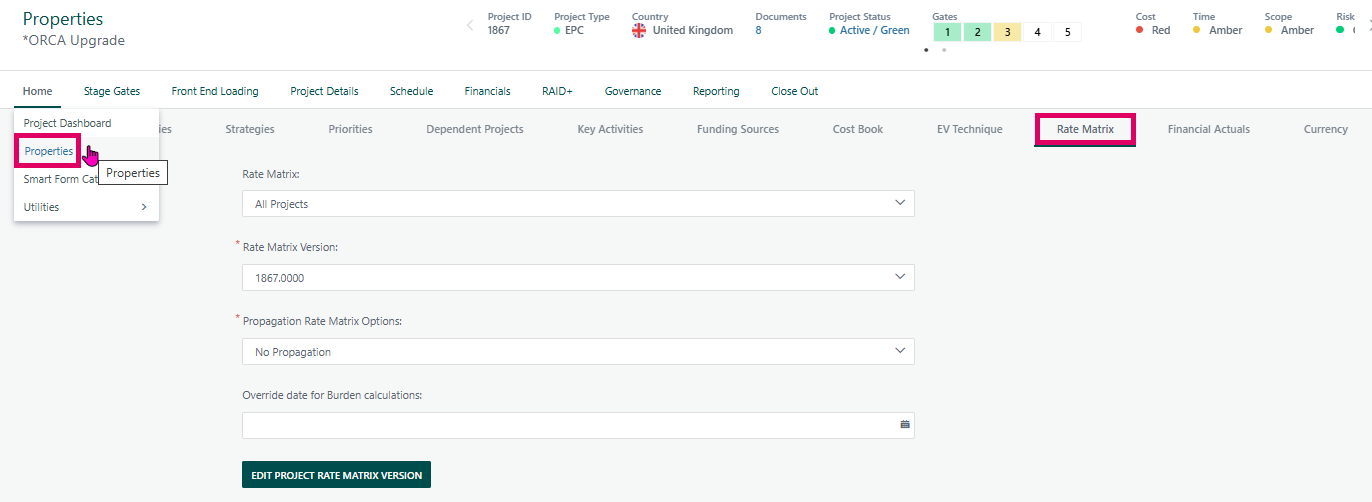
The Rate Matrix Version section in Cora PPM is a configuration panel found on the Project Properties page (under the "Rate Matrix" tab) and also within the Task Manager's Rate Matrix tab for individual tasks. It controls which specific version of a Rate Matrix is applied to calculate the cost, charge-out rates, and financial attributes for a project or task.
Gantt:
Properties:
What is a Rate Matrix Version?
A Rate Matrix is a structured lookup table that maps project classification attributes (such as skill type, project type, currency, cost centre, etc.) to cost and charge-out rates. Each Rate Matrix can have multiple versions, representing different rate schedules (e.g., different years or rate revisions). Every version has a numeric identifier (such as 1867.0000) which represents its version number stored to four decimal places.
The Inheritance Model
The key design principle is a cascading inheritance hierarchy. A rate matrix version can be set at multiple levels:
- Project level — a specific Rate Matrix and version can be directly assigned to the project.
- Task level — individual tasks can override the project-level version with their own specific version.
- Planned resource level — individual skill/material/facility/user records on a task can further refine the classification attributes used to look up the correct rate row.
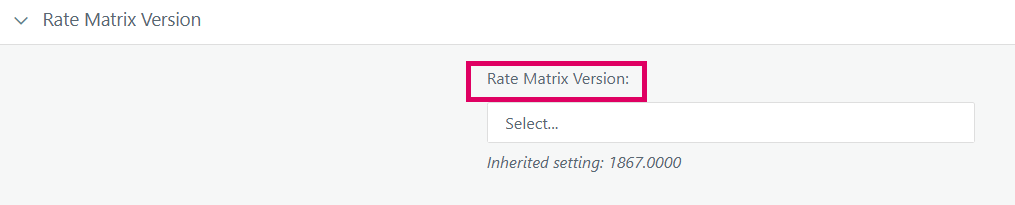
When a dropdown shows "Select..." (no explicit selection) and displays an "Inherited setting: 1867.0000" message in blue italic text below it, it means:
- The entity being viewed (task, skill entry, etc.) has not had a version explicitly chosen at its own level.
- The effective version being applied is 1867.0000, which is being pulled from the parent level in the hierarchy (typically the project's assigned Rate Matrix Version).
- This inherited value is informational only — it tells the user what will be used in rate calculations if they leave the dropdown unset.
This mechanism ensures that if a project manager assigns version 1867.0000 to the project, all tasks and resources within it automatically use that version's cost rates, unless a task owner deliberately overrides it.
The "Rate Matrix Version" Section in Practice
- Project Properties → Rate Matrix tab: Here the project-level Rate Matrix and Version are selected. This is the primary source of the inherited value seen on subordinate entities.
- Task Manager → Rate Matrix tab: Each task shows the same Rate Matrix Version dropdown. If the task has no explicit override, the dropdown is blank with "Inherited setting: 1867.0000" shown beneath it.
- Planned resource panels (Skills, Materials, Users, Facilities on a task): These can show further classification attribute dropdowns — each also respects the same inheritance logic, walking up through the task hierarchy to the project to find a set value.
Propagation
When a project's Rate Matrix Version is saved, the system offers three propagation options:
- No Propagation — only the project record itself is updated.
- Propagate to Inherited Versions — all tasks already using the inherited (parent's) version are updated to the new version.
- Propagate to All Tasks — all tasks in the project, regardless of whether they had an override, are forcibly updated to the project's new version.
After any change, the system flags the project as "dirty" in the rate-matrix recalculation queue, so that actual cost figures are recalculated by the background job.
Project-Specific Rate Matrix Versions
A special feature (controlled by a permanent feature toggle) lets project owners create a project-specific copy of a version — either blank or copied from the currently active version. This creates a new version row tied exclusively to that project's ID, allowing isolated rate adjustments without affecting the global version used by other projects.
Warning Indicator
If any tasks in the project have a Rate Matrix Version assigned that no longer belongs to the project's current Rate Matrix Description (for example, after a Rate Matrix type change), a warning banner appears indicating that re-propagation is needed.
Where to Find the Rate Matrix Version Section
On a Project:
- Open any project in Cora PPM.
- Click the "Properties" option from the project header or navigation.
- Select the "Rate Matrix" tab in the properties tab strip.
- The "Rate Matrix Version" section is displayed inside this tab (the
Properties_RateMatrixcontrol).
On a Task:
- Open a project and navigate to the Gantt / Task Manager.
- Click on a task row to open the Task Manager sidebar or panel.
- Select the "Rate Matrix" sub-tab within the task panel.
- The "Rate Matrix Version:" dropdown is displayed here
Was this article helpful?
That’s Great!
Thank you for your feedback
Sorry! We couldn't be helpful
Thank you for your feedback
Feedback sent
We appreciate your effort and will try to fix the article