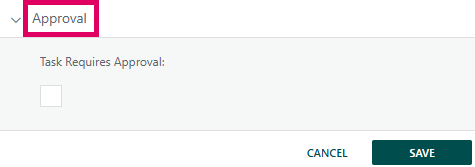
The Task Approval section is a collapsible panel within the Task Manager, accessible from any individual task in the Gantt chart or WBS view of a Cora PPM project. It provides a structured mechanism by which a task can be designated as requiring formal approval before — or after — it is considered complete.
What the feature does
When a project manager or authorised user opens a task and navigates to its Approval section, they are presented with a single checkbox: "Task Requires Approval". Ticking this checkbox signals that the task must be reviewed and signed off by one or more nominated approvers. When checked, a second control appears: a dual-list selector (a "swap list") that lets the user choose which system users are designated as approvers for this task.
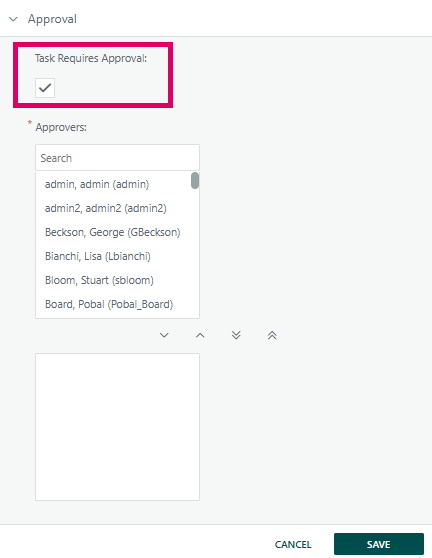
Once approvers are saved, the system:
- Notifies each newly assigned approver by email — provided the system-level alert "ToApproverWhenApproverSetOnTask" is switched on and the approver has a valid email address.
- Tracks approval status per user — each approver sees an Approve and Reject button (plus a comments field) once the task reaches 100% complete. They can enter a reason/comment and click Approve or Reject. Their decision is saved individually against the task.
- Updates the Gantt/WBS chart visually — the approval state is reflected on the chart (via a JavaScript update injected after save).
- Records full history — every time an approver is added, removed, or casts their vote, a history entry is written to the project audit trail under the action types "Approver Added/Deleted" and "Task Approved/Rejected".
- Optionally blocks percent-complete updates — the system configuration can be set so that a task's percentage cannot be advanced if an earlier task (or its predecessor) is still awaiting approval.
Prerequisites
- The Task Approvals feature must be enabled system-wide by a Cora PPM administrator before the Approval tab is visible on any task. If it is disabled, the Approval panel is completely hidden from the Task Manager.
- To see the Approval tab, you must have at least one of: full task access, access via a high-level deliverable (HLD), or ownership of the task.
- To add or remove approvers (i.e., change who is listed in the swap list), you additionally need the project right "Approvals – User Can Add/Delete Approvers".
- The Approval tab is not available on Mother Tasks (parent/summary tasks) or on Project Link tasks.
Was this article helpful?
That’s Great!
Thank you for your feedback
Sorry! We couldn't be helpful
Thank you for your feedback
Feedback sent
We appreciate your effort and will try to fix the article