Earned Value Techniques (EVT) in Cora PPM is the mechanism by which each task (work package) in a project's Gantt schedule is assigned a specific mathematical method for calculating how much budgeted work has actually been earned (the EV, or Earned Value) at any point in time. This is a core part of the Earned Value Management (EVM) module.
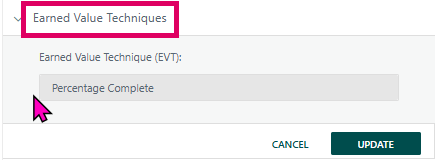
Every task in a project requires an EVT to participate in EVM performance reporting (BCWP, Schedule Variance, Cost Variance, etc.). The EVT determines how the system translates a task's physical progress into a financial/schedule "earned" percentage. Different task types (milestones, fixed-cost activities, materials-only tasks, etc.) are best measured by different techniques.
Available EVT Methods
The system supports twelve distinct techniques (defined as a system-wide enum):
Technique | Description |
|---|---|
Percentage Complete (default) | EV follows the task's raw % complete value entered by the project manager |
50/50 | 50% of the budget is earned when the task starts; the remaining 50% when it finishes |
0/100 | 0% earned until the task is fully complete, then 100% earned immediately — used for milestones (zero-duration tasks are only offered this technique) |
Units Complete | EV is driven by physical units of material delivered; only valid if the task has only material resources |
Apportioned Effort | EV percentage automatically mirrors one or more other "base" tasks selected in the panel; the task inherits the chosen tasks' earned percentage |
Level of Effort (LOE) | EV tracks actual time elapsed relative to the schedule; used for support/overhead tasks where effort is time-dependent |
XX/YY | A configurable split: XX% is earned at task start, YY% at task finish; XX + YY must equal 100 |
Incremental (Weighted) Milestones* | EV is earned in discrete steps as internal milestones/activities are completed; requires the task to have an Activity Group assigned |
Percent Complete with QBD | EV follows % complete but linked to a Quality Breakdown (QBD); also requires an Activity Group |
Weighted Percent Complete (Effort) | EV is a weighted average based on each resource's individual effort contribution |
PERT | Uses a probabilistic estimate (optimistic/most likely/pessimistic) for schedule measurement |
No Earned Value | The task is excluded from all EVM calculations |
*Incremental Milestone (formerly ID 6) is a special system-generated variant — when a task is configured as an incremental milestone child, it is flagged internally and the EVT panel shows only an informational message; the EVT dropdown and action buttons are hidden entirely.*
Where to Find It
- Open a project's Gantt view.
- Click on any task row to open the Task Manager side panel (or double-click to open the task detail dialog).
- In the Task Manager's tab strip, expand the "Earned Value Techniques" tab.
- The "Earned Value Technique (EVT):" dropdown and the CANCEL / UPDATE buttons are displayed inside this tab.
Was this article helpful?
That’s Great!
Thank you for your feedback
Sorry! We couldn't be helpful
Thank you for your feedback
Feedback sent
We appreciate your effort and will try to fix the article