Activities
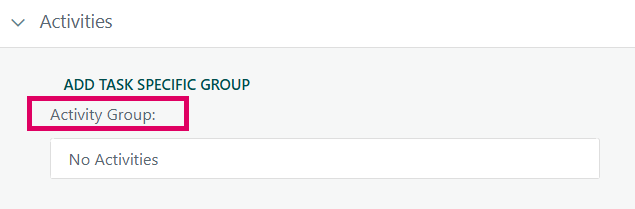
The Activities section in the Task configuration panel is a dedicated area within the Task Manager where users can assign an Activity Group to an individual task and then enter percentage-complete values against each activity within that group. The "No Activities" state you see in the Activity Group field simply means no activity group has yet been linked to this specific task.
There are two distinct modes for the Activity Group field:
- Standard (shared) activity groups – pre-configured groups that apply across multiple tasks or project types, selectable from the dropdown.
- Task-Specific groups – a group created exclusively for one task, triggered by the "Add Task Specific Group" button. These are named internally as
TaskSpecificTAG{TaskID}and only appear in the dropdown for the task they belong to.
When no activity group is assigned ("No Activities"), no activity grid is shown and the overall task percentage complete cannot be driven by weighted activities. If the task uses the Weighted Milestones or Percentage Complete with QBD Earned Value technique, the Save button is actually disabled until a group is selected — the system enforces that an activity group must be chosen for those EV techniques.
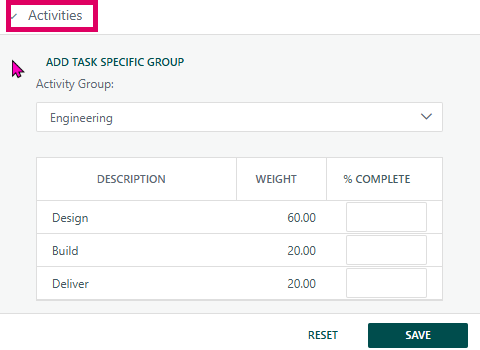
Once a group is selected, a grid of activities (each with a Description, Weighting, and % Complete field) appears. As users enter completion values, the system calculates a weighted average and automatically updates the task's overall percentage complete.
Was this article helpful?
That’s Great!
Thank you for your feedback
Sorry! We couldn't be helpful
Thank you for your feedback
Feedback sent
We appreciate your effort and will try to fix the article