Scheduling: Task Types
In project management—especially within Earned Value Management Systems (EVMS)—task types define how work is categorized, planned, and measured. Each plays a distinct role in managing scope, schedule, and cost.
Cora Task Types & Definitions
Task Type | Definition |
|---|---|
Control Account (CA) | The control account is the intersection of one WBS element and one organizational structure element representing a specific portion of program scope assigned to an individual manager. The control account is the minimum level where technical, schedule, and cost responsibility exists. |
Detailed Task (TSK) | Lowest level tasks in a Gantt schedule. |
Hammock (HAM) | A hammock activity is a grouping mechanism that summarizes or aggregates multiple related activities under a single, high-level task. The purpose of a hammock activity is to carry overhead costs and resources during a portion of the project. Like a level of effort task, it’s a way to apportion overheads without having to split them between the other activities or to summarize time required as a result of several tasks. |
Milestone (MS) | A zero-duration schedule event or point in time that is measurable but does not consume time or resources. |
Planning Package (PP) | A PP is a holding account (within a control account) for budget for future work that is not yet practicable to plan at the work package level. The PP budget is time-phased in accordance with known schedule requirements (due dates) for resource planning and plans are refined as detail requirements become clearer and time to begin work draws nearer. |
Schedule Margin (SM) | A technique for improving schedule accuracy by modeling the anticipated impact of schedule risk in the schedule. Schedule margin activities are established and managed as a margin of time in the schedule to offset unforeseen issues during project execution. |
Schedule Visibility Task (SVT) | A schedule activity that is not resource loaded and represents effort that is not part of the budgeted project scope, but is necessary to complete a logical sequence of activities and properly time-phase downstream project effort. |
Summary (SUM) | A higher-level task that represents a group of subtasks or phases within a project. It's essentially a container for other, more detailed tasks. |
Summary Level Planning Package (SLPP) | Used to establish high level holding accounts for budget that is identified to some work scope, but which is not ready to be detail planned so, has not yet been allocated to Control Accounts (CAs). |
Work Package (WP) | A WP is a task/activity or grouping of work under a Control Account. A WP is the point at which work is planned, progress is measured, and earned value is computed. |
How to Use This Function or Component (End User)
End Users can identify task types on their schedule two different ways: directly on the schedule or via the Work Breakdown Structure Register.
1. Via the Gantt Chart
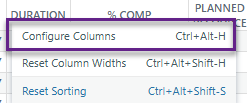
- Right-click on the column headers and select Configure Columns.
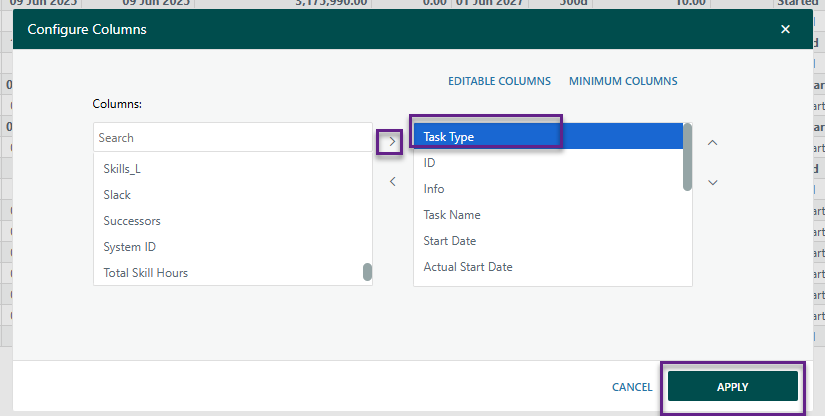
Ensure Task Type is included in the Selected Columns box on the right, then click Apply.
- Users can double-click a task's Task Type cell and choose the appropriate type from the dropdown list.
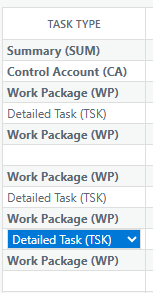
- The selection will be saved automatically when the user clicks off the task.
2. Via the Work Breakdown Structure (WBS) Register
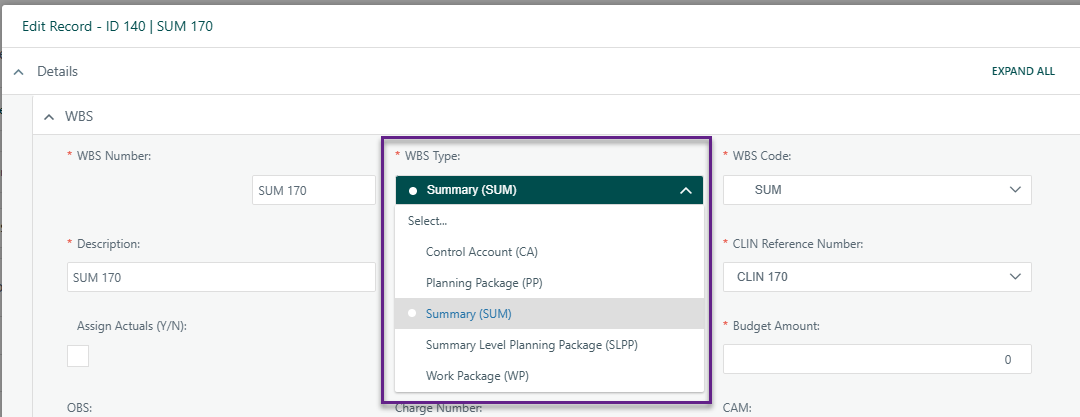
- In the WBS Register, a Task Type dropdown field is available for each task.
- Users should select the appropriate WBS Type to classify the task accordingly.
Notes:
- When a task is assigned the "Milestone" Task Type, the system will automatically check the "Has a Milestone Deliverable" box.
- Validation Warnings:
Users will receive warning messages if the Task Type and Milestone Deliverable settings are not aligned. Duration Restrictions:
The Duration field is locked when both:
- Task Type = Milestone, and
- Has a Milestone Deliverable is checked.
- Users cannot enter any value other than 0 for duration on a Milestone task.
- Schedule Import Validation:
The system will alert users during Schedule Import if there are discrepancies between Milestone Task Types and Duration values.
Was this article helpful?
That’s Great!
Thank you for your feedback
Sorry! We couldn't be helpful
Thank you for your feedback
Feedback sent
We appreciate your effort and will try to fix the article