Archiving and Deleting Projects
Overview
When a project is finished, canceled, or created by mistake, you can either archive it or delete it. Archiving takes the project out of day-to-day use but keeps all of its data, and you can undo it at any time. Deleting removes the project and its data permanently.
Archive or Delete? Quick Comparison
Archive | Delete | |
|---|---|---|
Where You Do It | Project Properties › Settings tab › Archived checkbox | Delete Project screen (from Project Properties › Settings, the Program View right-click menu, or the Gantt/WBS) |
Data Kept? | Yes. Nothing is removed. | No. Tasks, schedule, Smart Form data, risks, issues, benefits, budgets, baselines, and user access are removed. |
Can It Be Undone? | Yes. Clear Archived and save. | No. There is no restore. |
Allowed if Actuals Exist? | Yes | No. Projects with recorded time, expenses, facility or material actuals, invoices, financial system data, forecasts, or Cost Book actuals cannot be deleted. |
Who Can Do It | Users with the Project Owner profile on the project (and superusers) | Project Owners and/or Portfolio Managers, depending on how your administrator has set it up |
Audit Trail | "Project Archived" / "Project Restored" entry in project history | "Project Deleted" entry, reportable in the System Audit report |
Best For | Completed, closed, canceled, or on-hold work that has history worth keeping | Duplicates, test or training projects, and projects created in error that have no actuals |
Rule of thumb: if anyone has booked time or cost to the project, or you might ever need to report on it, archive it. Delete only things that should never have existed.
What is it Used For?
Over time, a portfolio fills up with finished, canceled, and test projects. Left in place, they clutter project lists, the Program View and the Gantt, keep sending alerts, and let people book time to work that is over. Customers archive and delete projects to:
Keep the active portfolio clean. Program View, Gantt/WBS, and project pickers show only live work, so portfolio reviews and resource planning reflect reality.
Stop new time and cost landing on closed work. Archived projects drop out of the timesheet project list and cannot be booked to unless your administrator allows it.
Silence noise. Risk, issue, action, change request, register, and task-approval emails stop for archived projects.
Protect history for audit and lessons learned. Archiving keeps financials, schedules, risks, and documents intact for reporting, audits, and future estimating.
Remove genuine mistakes. Deleting removes duplicates, test projects, and rejected requests that would otherwise distort counts and reports.
Close out at the right level. Archiving a program can archive every sub-project in one step.
Use Cases by Industry
Manufacture to Order (MTO)
As a Project Manager, I archive an order project once the product has shipped, been invoiced, and passed its warranty period. Its cost history stays available for quoting similar orders.
As an Operations Lead, I archive a canceled order that already had engineering hours booked. The hours stay on record and the team can no longer book time to it.
As a Sales Engineer, I delete a quote project that was set up twice by mistake, before anyone records time against it.
As a PMO Analyst, I run the Archived Projects report for the year to compare closed orders against their original budgets.
Pharma and Life Sciences
As a Portfolio Manager, I archive a development program after a stage-gate "no-go" decision. With Propagate Archive on, all its studies and workstreams are archived together, and the full record is kept for regulatory inspection.
As a Clinical Operations Lead, I archive a completed study once the clinical study report is final. Its risks, issues, and documents stay available for audit.
As a Quality Lead, I make sure that projects holding validated (GxP) records are archived, never deleted, so we meet our record retention obligations.
As a Project Coordinator, I delete training or sandbox projects created during onboarding.
Capital Projects
As a Capital Project Manager, I archive a CAPEX project after commissioning, handover, and financial close. Its spend history stays available for asset capitalization and post-investment review.
As a Finance Business Partner, I make sure archived capital projects can no longer take timesheet bookings, so no labor is charged to closed cost codes.
As a PMO Lead, I delete project requests that were rejected at the investment committee and never started.
As a Program Director, I archive a deferred project while it is on hold, then restore it when funding is approved.
Government Contracting (GovCon)
As a Contract Program Manager, I archive a contract project after final delivery and contract close-out. Its cost and labor records stay in place for audits and retention periods.
As a Timekeeping Administrator, I rely on archiving to stop employees charging time to a closed charge number, which supports timekeeping compliance.
As a Capture Manager, I archive a lost bid's proposal project instead of deleting it if proposal hours were recorded (B&P costs), so the hours remain traceable.
As a PMO Analyst, I delete a duplicate task-order project created in error before any labor is booked.
Retention reminder: Regulated industries (Pharma, GovCon, public-sector capital) usually have formal record retention rules. Check your organization's retention policy before deleting anything. If in doubt, archive.
How to Archive a Project
Before you start: you need the Project Owner profile on the project. If you cannot see the Settings tab, ask your Project Owner or Cora administrator.
Open the project. You can use your project list or the Program View: right-click the project and choose Edit Project.
Open Project Properties and select the Settings tab.
[SCREENSHOT SUGGESTED: Project Properties › Settings tab, with the Archived and Propagate Archive checkboxes highlighted]Select Archived. Propagate Archive is selected and grayed out automatically, so any sub-projects under this project are archived too.
Click Save.
You will see the message "Settings successfully updated". In the Program View, the project now shows an archived folder icon. If your organization hides archived projects there, it no longer appears.
No confirmation dialog appears and there is no reason field. If you need to record why the project was archived, add a note to the project (for example, in a Smart Form field or project comment) before archiving.
What Changes Once a Project is Archived
Area | Effect |
|---|---|
Data | Nothing is deleted. Tasks, financials, risks, issues, Smart Forms, and documents stay as they were. |
Project Status | Unchanged. Archiving is separate from the Project Status field, so update the status yourself (for example, to "Closed") if your process requires it. |
Program View | Shown with an archived folder icon, or hidden, depending on an admin setting. |
Gantt / WBS | Archived linked projects are hidden unless your administrator has turned on "Show archived Projects in Gantt/WBS." |
Timesheets | Removed from the timesheet project list. Submitting time shows "You cannot book time against archived projects," unless your administrator allows it. |
Emails and Alerts | Risk, issue, action, change request, register, task approval, and task association notifications stop. |
Scheduling | Archived projects are skipped when linked projects are rescheduled. |
Project Forecasting | Load from Schedule, Load from Registers, Snapshot, Save, and Calculate are disabled. |
Project Pickers and Reports | Excluded by default. Use Include Archived Projects in the project selector to bring them back into a report or view. |
Smart Form Formulas | Recalculated when you save. |
How to Restore an Archived Project
Find the project. Use the Archived Projects report or a project selector with Include Archived Projects selected, and open it.
Go to Project Properties › Settings.
Clear Archived.
To restore all sub-projects as well, select Propagate Archive. Leave it cleared to restore only this project.
Click Save. The project returns to active lists, timesheets, and alerts, and a "Project Restored" entry is added to its history.
How to Delete a Project
Deleting is permanent. There is no undo and no recycle bin. Deleted data cannot be recovered from inside Cora. Archive instead if there is any chance you will need the project again.
Before you start, check that:
You have delete rights. You are the Project Owner and your organization allows owners to delete, or you hold the Portfolio Manager role and your organization allows Portfolio Managers to delete.
No actuals exist (time, expenses, facilities, materials, financial system lines, invoices, forecasts, Cost Book actuals).
The project is not checked out by anyone.
There are no active workflows on the project, its project request, its registers, or its Smart Forms, including those of its sub-projects.
The project is not used as a template in the Project Request configuration.
You cannot delete projects that have timesheet hours, expenses or financial data recorded against it.
Step 1: Open the Delete Project Screen
Use any of these routes:
Project Properties › Settings tab › Delete Project link. If the link is grayed out, hover over it to see why.
Program View: right-click the project and choose Delete.
Gantt / WBS of a parent project: select the sub-project row and delete it. In the pop-up, select the box to fully delete the project. Leave it cleared to only unlink it (see below).
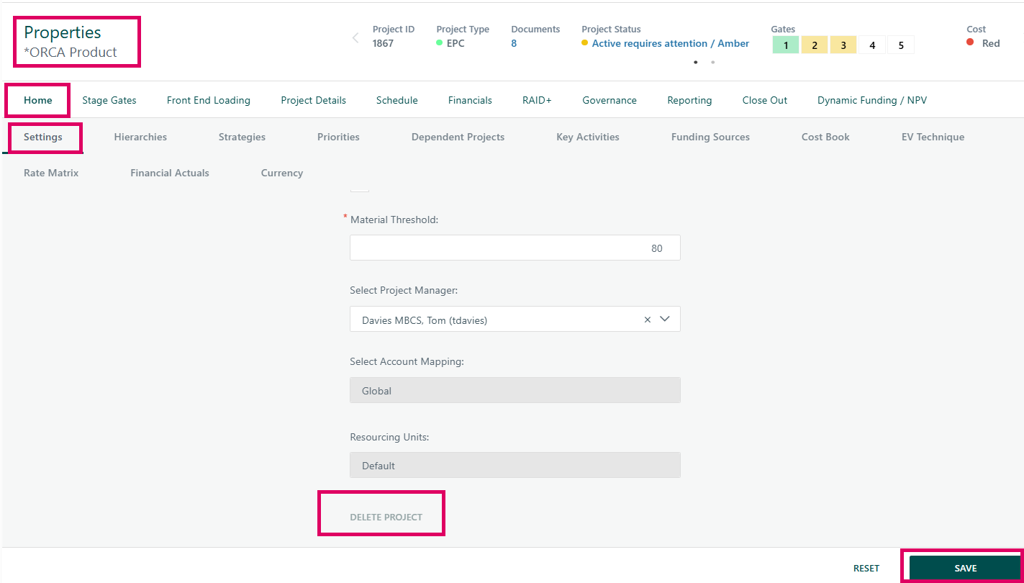
Step 2: Review What Will Be Affected
The screen shows:
Current Project: the project (or projects) you are deleting.
Parent Project: shown if the project sits under a parent.
The Project will be removed from the following Projects: the parent projects it is linked into.
The Project contains the following Projects: its sub-projects.
If something blocks the delete, a message appears here instead (see "Why can't I delete?" in the FAQs).
If you see "Warning: This Project is referenced in another project…", another project's Smart Form points to this one. You can still delete, but that reference will be cleared.
Step 3: Decide What Happens to Sub-Projects
If your administrator has enabled deep delete and the project has sub-projects, you will see Delete all sub Projects. Select it to delete the whole branch.
If the box is disabled, at least one sub-project cannot be deleted. Either you do not have rights to all of them, actuals exist, or some are checked out.
If you do not delete them, the remaining sub-projects are kept and moved to the top level of the Program View.
Step 4: Confirm Each Area in the "Confirm Deletion of Project Details" Grid
The grid lists everything that will be removed, with a count for each. Select Select on every row to confirm. Rows with an amount of 0 are selected for you.
If you miss a row, the page shows "Confirmation for … is required".
Step 5: Delete
Click Delete.
In the "Delete Project" pop-up ("Are you sure you want to delete this Project?"), confirm.
You will see "Project has been deleted" (or "Projects have been deleted") and return to the project dashboard or the Gantt.
Click Cancel at any point to leave without deleting anything.
How to Unlink a Sub-Project Instead of Deleting
If a project was linked under the wrong parent, unlink it. Unlinking removes it from the parent and keeps the project and its data.
In the Program View, right-click the sub-project and choose Unlink Project. Or, in the parent's Gantt/WBS, delete the sub-project row and leave the "fully delete" box cleared.
Review the screen and click Unlink, then confirm "Are you sure you want to unlink this Project?".
You will see "Project has been unlinked".
If a sub-project has actuals, Cora unlinks it rather than deleting it when you remove it from a Gantt.
How to Find Archived and Deleted Projects
Archived Projects Report
Go to Reports › Archived Projects.
Choose a Date Range.
Pick one option:
Show projects with a start date or end date within the date range selected, or
Show projects that were archived within the date range selected.
Click Run. Click a project's description to open it, for example, to restore it.
Column | What It Shows |
|---|---|
Description | Project name. Click it to open the project. |
Live Date | The date the project went live |
Start Date | Project start date |
Finish Date | Project finish date |
Archived Date | The date the project was archived |
NB: You only see projects you have access to.
System Audit Report (Deleted Projects)
Deleted projects cannot be opened, but there is still a record that they existed. Go to Reports › System Audit and choose Deleted Projects. Related options include Tasks, Scope, Risks and Issues, and Benefits in Deleted Projects. Access to this report depends on your role.
Screen and Data Reference
Project Properties › Settings Tab (Archive Fields)
Field | Type | What It Does |
|---|---|---|
Archived | Checkbox | Selected: the project is archived and the archived date is set to today. Cleared: the project is active. |
Propagate Archive | Checkbox | Applies the archive or restore to every sub-project below this one. It is always on when archiving and optional when restoring. |
Delete Project | Link | Opens the Delete Project screen. Grayed out, with a tooltip, if you lack rights or actuals exist. |
Save | Button | Saves the change and shows "Settings successfully updated." |
Delete Project Screen
Field / Control | What It Shows or Does |
|---|---|
Current Project | Name(s) of the project(s) being deleted |
Parent Project | The parent, if the project is a sub-project |
The Project will be removed from the following Projects | Parent projects that link to this one |
The Project contains the following Projects | Sub-projects under this one |
Delete all sub Projects | Shown only when deep delete is enabled. Deletes the full branch. |
Confirm Deletion of Project Details | Grid with Select, Area, and Amount columns. Every row must be selected. |
Cancel | Leave without deleting |
Delete | Asks for confirmation, then permanently deletes |
Confirmation Grid Areas
Area | What the Amount Counts |
|---|---|
Number of Tasks | Tasks in the project schedule |
Number of Task Documents | Documents attached to tasks |
Total Task Document Size | Combined size of those documents |
Number of Planned Users | People planned (allocated) on the project |
Number of Planned Facilities | Facilities planned on the project |
Number of Planned Materials | Materials planned on the project |
Number of Workflow Instances | Workflow instances on the project (shown only if workflow is in use) |
Number of Workflows from Project Requests | Workflows started from the project's request |
Number of Active Workflows from Project Registers for This or Sub-Projects | Live register workflows |
Number of Active Workflows from Smart Forms for This or Sub-Projects | Live Smart Form workflows |
Number of Cost Book Lines | Cost Book lines that will be removed (shown only if Cost Book is in use; always pre-selected) |
FAQs
Question | Answer |
|---|---|
Should I archive or delete? | Archive in almost every case. Delete only duplicates, test projects, or projects created in error that have no actuals and no history worth keeping. |
Why can't I delete this project? | The Delete Project screen explains which rule applies. Common reasons include actuals, Cost Book actuals, checked-out projects, active workflows, project request workflows, Project Request configuration, or missing delete rights. |
I cannot see the Settings tab or the Archived checkbox. | The Settings tab is shown only to users with the Project Owner profile on that project (and superusers). It is also hidden when your organization uses the Project Wizard. Ask your Project Owner or Cora administrator. |
Can I get a deleted project back? | Not from within Cora. Deletion is permanent. The System Audit report shows that it was deleted, but not its data. Any recovery would mean a database restore by your IT team or Cora Support, which is not guaranteed. |
Does archiving change the project status to Closed? | No. Archiving and Project Status are separate. If your process needs a "Closed" status, set it on the project before or after archiving. |
Can people still book time to an archived project? | Not by default. Archived projects drop out of the timesheet project list, and submitting time against one is blocked. Your administrator can allow bookings to archived projects if your organization needs that, for example, for late time entries. |
Will archived projects still appear in reports and dashboards? | Most project pickers and lists exclude archived projects unless you select Include Archived Projects. Behavior can differ by report. Check the report's project selector settings. |
If I archive a program, what happens to its sub-projects? | They are archived too. Propagate Archive is forced on when archiving. When restoring, you choose whether to restore the sub-projects as well. |
If I delete a parent project, are the sub-projects deleted? | Only if you select Delete all sub Projects, which appears only when your administrator has enabled deep delete. Otherwise, the sub-projects are kept and moved to the top level. |
Is there a record of who archived or deleted a project? | Yes. Archive and restore are recorded in the project's history. Deletions are recorded and can be listed in Reports › System Audit › Deleted Projects. |
Acronyms and Terms
Term | Meaning |
|---|---|
PPM | Project Portfolio Management: managing a set of projects and programs together to meet business goals |
PMO | Project (or Portfolio) Management Office: the team that sets project standards and governance |
PM | Project Manager |
MTO | Manufacture to Order: products built only after a customer order is received, each order often run as its own project |
GovCon | Government Contracting: work delivered under contracts with government agencies |
CAPEX | Capital Expenditure: spend on long-term assets such as plant, buildings, or equipment |
GxP | "Good Practice" quality guidelines in life sciences (for example, GMP, GCP, GLP) |
GMP / GCP / GLP | Good Manufacturing / Clinical / Laboratory Practice |
B&P | Bid and Proposal: costs incurred preparing bids for contracts |
WBS | Work Breakdown Structure: the hierarchy of tasks in a project; also the Cora screen of the same name |
Gantt | Timeline (bar chart) view of a project schedule |
Actuals | Time and cost actually recorded against a project (timesheets, expenses, facilities, materials, invoices, finance system lines) |
Program View | Cora's tree view of programs, projects, and sub-projects |
Sub-project | A project linked beneath another (parent) project or program |
Propagate Archive | Applies an archive or restore to every sub-project beneath the current project |
Deep Delete | An admin option that lets you delete a project and all of its sub-projects in one go |
Unlink | Removes a sub-project from its parent without deleting it |
Checked Out | A project locked for editing by another user, usually in the Gantt |
Smart Form | A configurable data-capture form attached to a project |
Cost Book | Cora's module for budget, forecast, and actual cost lines |
Project Owner | A project-level access profile with full control of the project, including its Settings tab |
Portfolio Manager | An application role. Where enabled, it can delete projects across the portfolio. |
Related Materials
Notes
Neither archive nor delete has a reason or comment field. Record your reason elsewhere on the project before acting.
Archiving does not make the whole project read-only. Restrictions apply screen by screen (timesheets, forecasting, alerts, and scheduling, as listed above).
For some customers, archiving also moves the project into an archive folder in the hierarchy. Check with your administrator if this applies to you.
Projects can also be archived through the Cora API or a project details import. Those changes appear in the project history too.
Was this article helpful?
That’s Great!
Thank you for your feedback
Sorry! We couldn't be helpful
Thank you for your feedback
Feedback sent
We appreciate your effort and will try to fix the article