CORA PPM · REPORTS
Understanding & Using the Reports Screen
Purpose: A working guide to the Cora PPM report catalog: what it is, why it matters, how different delivery organizations use it, and how to run reports effectively.
What It is
A Single Front Door to Every Report in the System
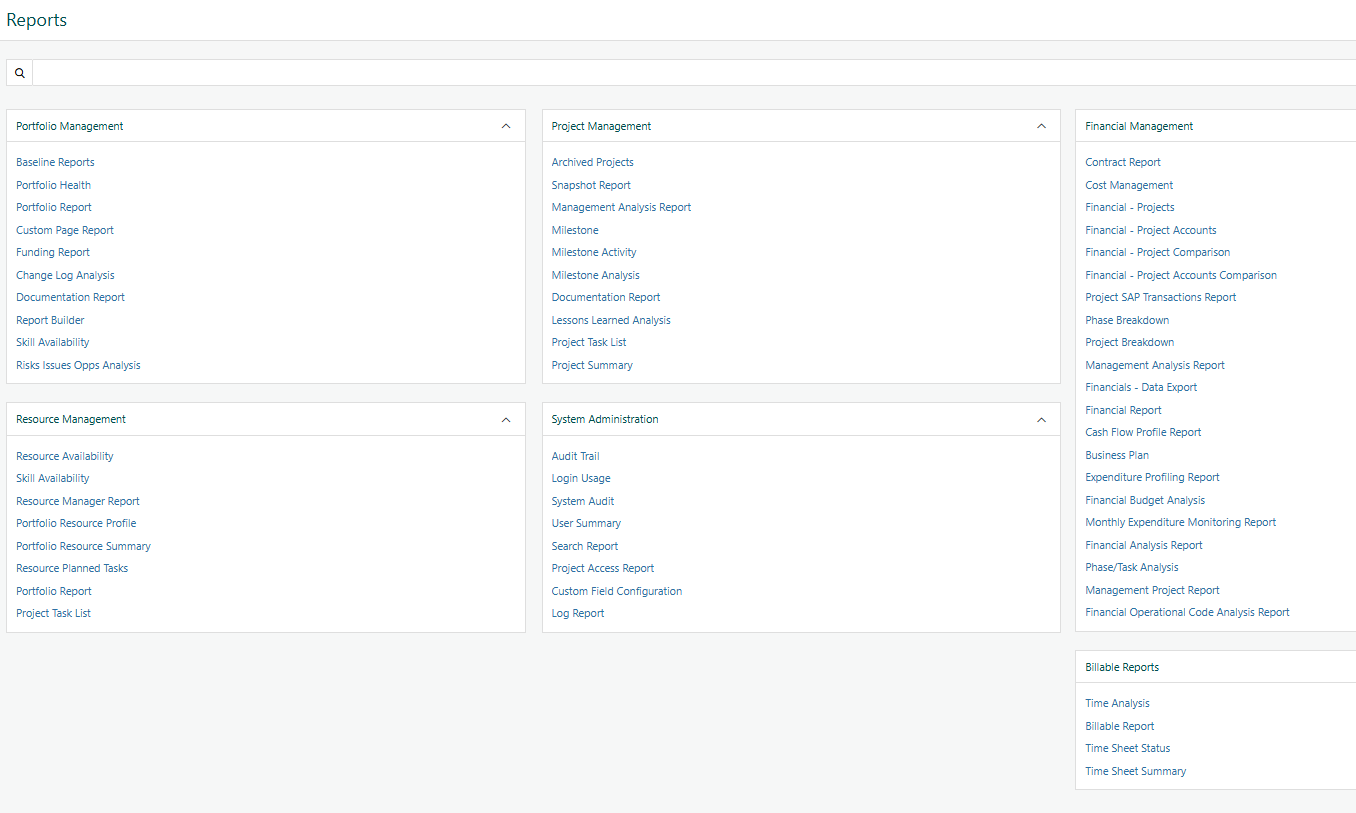
The Reports screen (Reports in the main navigation) is Cora PPM's central report catalog — not a report itself, but the launcher that opens every reporting option available to you.
Reports are grouped into categories such as Portfolio Management, Project Management, Financial Management, Resource Management, System Administration, and Billable Reports. Each category can be expanded, collapsed, or searched.
Report Type | What Happens | Best Used For |
|---|---|---|
Parameterized Report | You choose filters first, then run the report. | Standard reporting with project, programme, date, status, skill, or risk criteria. |
Report Builder Page | You choose the data area, filters, and columns. | Ad-hoc views that can be saved and reused. |
Direct Report | The report opens straight into results with built-in filtering. | Fast access to commonly reviewed information. |
Which reports you see depends on role permissions, license configuration, and administrator settings, so catalogs can vary between users and organizations.
Typical Catalog Categories
Category | Example Reports |
|---|---|
Portfolio Management | Portfolio Health, Baseline Reports, Funding Report, Report Builder |
Project Management | Milestone Analysis, Milestone Activity, Project Summary, Lessons Learned Analysis |
Financial Management | Cost Management, Phase Breakdown, Financial Budget Analysis, Cash Flow Profile Report |
Why Teams Use It
One Place to Answer “How Are We Actually Doing?”
Portfolio, project, financial, and resource data already live inside Cora PPM. The Reports screen turns that data into practical insight without requiring teams to export and combine spreadsheets manually.
- Governance and decision support: PMO leads and sponsors use portfolio and project reports to support stage-gate and go/no-go decisions.
- Financial control: Finance teams use cost, phase breakdown, and budget reports to monitor spend against plan.
- Resource and capacity planning: Resource managers review availability, allocation, and skill coverage across the pipeline.
- Accountability and audit: Audit Trail and system-administration reports provide a record of key changes.
- Client and contract billing: Billable and time-analysis reports connect logged effort to invoicing and utilization.
- Self-service reporting: Report Builder lets users create reusable views without raising a development request.
Common Use Cases by Delivery Model
The Same Catalog, Read Differently by Sector
Cora PPM reports are not sector-specific products. The same report catalog supports different operating models; what changes is which reports each team relies on most.
Project Type | Reporting Focus | Useful Reports |
|---|---|---|
? Manufacture-to-Order | Job-shop capacity and margin protection. | Skill Availability, Resource Availability, Cost Management, Phase Breakdown |
? Pharma and Life Sciences | Traceability, compliance evidence, and stage-gate discipline. | Audit Trail, Milestone Analysis, Documentation Report |
?️ Capital Projects | Capex discipline, funding visibility, and baseline control over long horizons. | Phase Breakdown, Cash Flow Profile Report, Baseline Comparison |
?️ Government Contracting | Cost accountability, audit readiness, and contract oversight. | Financial Budget Analysis, Audit Trail, Management Analysis Report |
Note: Earned Value Management (EVM) is configured separately as a project-dashboard capability. It is related to reporting, but it is not normally listed as a standard Reports catalog entry.
Acronyms Used on This Screen and Guide
Plain-Language Definitions
Term | Meaning |
|---|---|
PPM | Project and Portfolio Management — planning, tracking, and governing projects as a portfolio. |
SAP | An enterprise resource planning system that many customers integrate with for project financial transactions. |
EVM | Earned Value Management — a cost and schedule performance technique comparing planned, earned, and actual value. |
KPI | Key Performance Indicator — a defined metric tracked against a target. |
GovCon | Government Contracting — delivering projects under a government or public-sector contract. |
MTO | Manufacture-to-Order — a production model where each customer order triggers its own project. |
Step by Step
Running a Report, Start to Finish
The exact filter options vary by report, but the flow below applies to most reports in the catalog.
- Open Reports: From the main navigation, select Reports.
- Find the report you need: Scan categories, collapse sections you do not need, or use the search box to filter report names.
- Click the report name: The report may open a parameter screen, direct results, or a Report Builder page.
- Set your filters: Choose the relevant project, programme, date range, financial period, status, skill, risk level, or other criteria.
- Run it: Select Run, View, or the equivalent generate control.
- Export if needed: Send the output to Excel, Word, PDF, or HTML when the report needs to be shared outside Cora PPM.
- Save your configuration: For Report Builder reports, name and save your filter and column selection for reuse.
- Repeat as needed: Return to the catalog to run the next report.
Tip: Catalog search filters report names only. It does not search inside report content or query the server.
FAQ
Questions That Come Up in Practice
Question | Answer |
|---|---|
Why Don't I See Every Category or Report Other Colleagues Have? | Visibility is controlled by role permissions, license configuration, and administrator settings. |
What's the Difference Between a Regular Report and Report Builder? | A regular report has a fixed layout with parameters. Report Builder lets you choose the data area, filters, and columns. |
Can I Save a Report So I Don't Have to Re-Set the Filters Every Time? | Yes, for Report Builder-style reports. Shared system configurations are managed by administrators. |
Can Reports Be Scheduled or Emailed Automatically? | Not as a built-in feature of the catalog. Check with your Cora administrator or account team for recurring delivery options. |
What Formats Can I Export To? | Most reports support Excel, Word, PDF, and HTML. Available formats vary by report. |
Where is Earned Value Management Reporting? | EVM is usually configured separately as a project-dashboard capability rather than as a standard catalog report. |
Does the Search Box Search Inside Reports, or Just the List? | Just the list. It filters visible report names on the catalog screen as you type. |
Who Decides Which Reports Exist in Our Catalog? | Administrators manage catalog entries, naming, order, and visibility rules. |
Cora PPM — internal reference guide. Report names and categories reflect a representative configuration; your organization's catalog may vary.
Was this article helpful?
That’s Great!
Thank you for your feedback
Sorry! We couldn't be helpful
Thank you for your feedback
Feedback sent
We appreciate your effort and will try to fix the article