User Qualifications Tab
Prerequisite: Enable Qualifications
Before the tab appears, a system administrator must turn on the feature:
- Navigate to Admin → System Configuration → General Settings.
- Find the Qualifications Enabled checkbox and tick it.
Save. The User Qualifications tab will now be visible across the application.
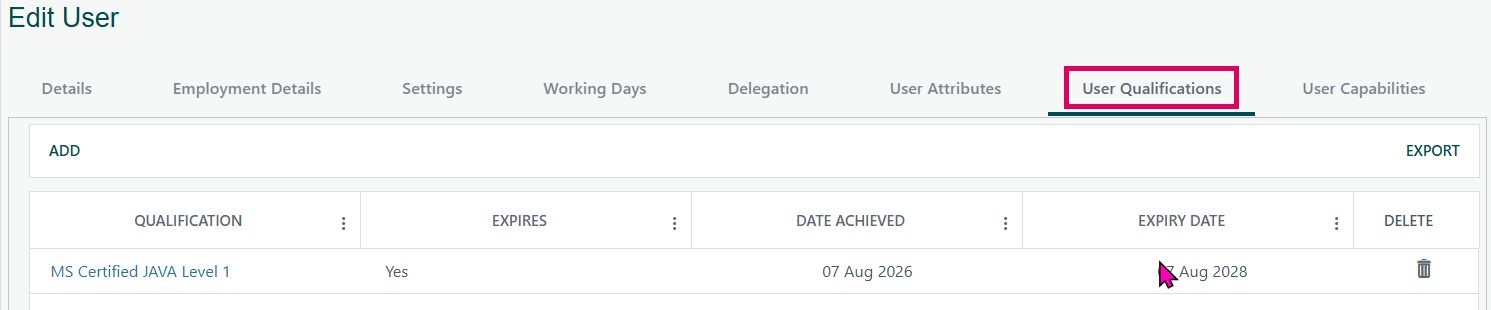
The Qualification feature in Cora PPM allows administrators to record and manage formal credentials, certifications, or qualifications held by individual users (resources). Each qualification entry captures:
- Which qualification the user holds (chosen from a system-wide list of qualification types)
- The date the user achieved it
- The expiry date (if the qualification type is configured to expire)
The tab appears in two places in the application:
- Admin User Edit screen — the full administrative user management popup, where admins manage all aspects of a user record. The User Qualifications tab on this page hosts a detailed grid of the user's qualifications, each row showing the qualification name, whether it expires, the date achieved, the expiry date, and a delete button. Adding or editing qualifications opens a dedicated modal dialog.
- My User Details screen — a lighter self-service or manager-facing popup, which also includes a User Qualifications tab following the same pattern.
There is also a third, simpler view: the userSettings user control, which appears inside both pages and shows a basic swap-list of available qualifications alongside skills and groups — this is a legacy simple-assignment view used when detailed date tracking per qualification is not needed.
The entire feature is gated by a global configuration flag called Qualifications Enabled. If this is turned off in system settings, the User Qualifications tab is hidden everywhere and the swap-list in the user settings control is also hidden. When enabled, the tab becomes visible and fully functional.
All changes (add, update, delete) to user qualifications are written to the system audit history, including the qualification name, achieved date, and expiry date.
Was this article helpful?
That’s Great!
Thank you for your feedback
Sorry! We couldn't be helpful
Thank you for your feedback
Feedback sent
We appreciate your effort and will try to fix the article