User Capabilities Tab
As an Administrator:
- Navigate to Administration → Users
- Click on a user to open their profile in the Admin User Edit popup.
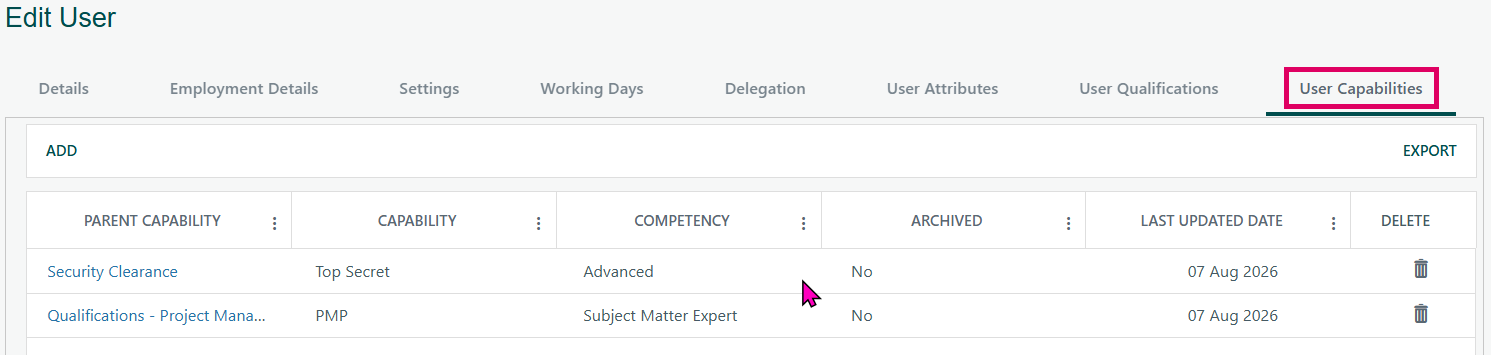
Click the Capabilities tab in the tab strip at the top of the profile.
As a User (My Profile):
- Open My User Details from your profile menu.
- Click the Capabilities tab.
The User Capabilities tab is a section within a user's profile in Cora PPM that allows administrators (and users themselves, via the My User Details page) to record and manage a structured set of skills or competencies that a particular user possesses. It is the PPM system's way of cataloguing what a person can do and how well they can do it, using a two-level hierarchical classification combined with a proficiency level.
Each capability entry assigned to a user consists of three pieces of information:
- Parent Capability — a top-level category (e.g., "Project Management", "Engineering"), maintained by system administrators in a separate configuration screen.
- Capability — a specific skill underneath the selected parent (e.g., "Risk Management" under "Project Management"). The list of available capabilities is filtered based on the chosen parent.
Competency — the user's current proficiency level for that capability. There are five fixed levels: i
- Training Only,
- Basic,
- Intermediate,
- Advanced and
- Subject Matter Expert.
A capability entry can also be flagged as Archived, which marks it as inactive while keeping the historical record. The system automatically records and displays the Last Updated Date — the date the entry was most recently saved — using the date format preference of the logged-in administrator.
The tab is always visible and functions identically whether accessed by an admin through the Admin User Edit screen or by a user viewing their own profile through the My User Details screen
The system enforces duplicate prevention: the same Parent Capability + Capability combination cannot be assigned to the same user more than once. Any changes — additions, edits, and deletions — are fully audit-logged against the user's history record.
Was this article helpful?
That’s Great!
Thank you for your feedback
Sorry! We couldn't be helpful
Thank you for your feedback
Feedback sent
We appreciate your effort and will try to fix the article