Registers: Copy & Moving Register Records
The Copy / Move Register Record feature in Cora PPM lets users duplicate, relocate, or transfer individual records (entries) within and between Custom Project Registers — without having to manually re-enter all the data. It serves four distinct purposes accessible from a single modal dialog:
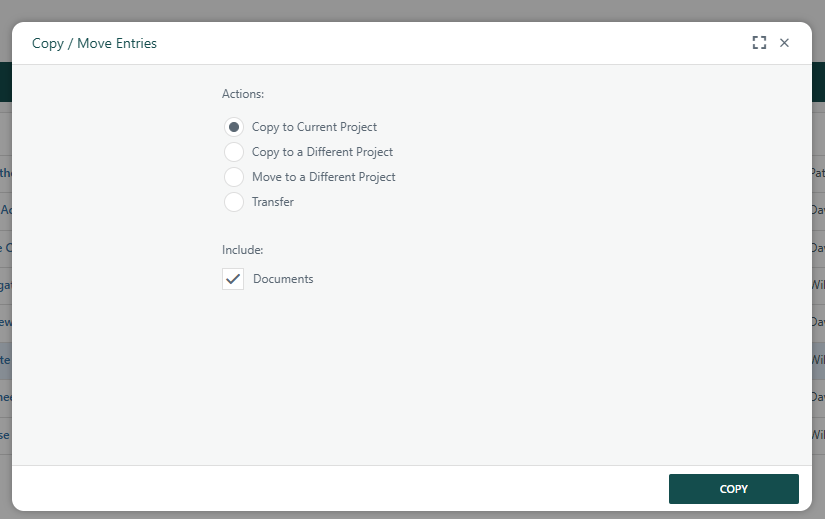
Copy to Current Project
Creates an identical copy of the selected record within the same register and project. All field values are copied, but calculated fields are cleared so they recalculate fresh. The user is then offered the opportunity to immediately open and edit the new copy.
Copy to a Different Project
Copies one or more selected records into the same register type on one or more different projects. The system confirms the destination project and again prompts the user to open and edit the newly created record.
Move to a Different Project
Physically relocates the record to the same register on another project. Unlike a copy, the original record no longer exists in the source project after the move. Records that have an active workflow in progress cannot be moved; the system blocks the action and shows an error message. Documents always accompany a move.
Transfer to a Different Register
Moves the record to a completely different register (of the same type) within the same project. This transfers field data to the destination register's schema. Permission is required on the destination register to perform a transfer.
In all copy and move scenarios, attached documents can optionally be included or excluded using the "Include Documents" checkbox. For copy operations to a different project, an optional Submit to Workflow checkbox is available (when the workflow feature is active) to automatically start a workflow for each newly created copy.
Bulk Copy
The Bulk Copy function allows the user to select multiple records using the checkboxes on the register grid and copy/move all of them at once. See how to use the bulk copy using inline editing features.
Administrators control whether the Copy button appears on the grid at all via the Enable Copy option in the register's admin configuration screen. If a record is locked, Move and Transfer actions are disabled, but copying to the current or a different project remains available.
Was this article helpful?
That’s Great!
Thank you for your feedback
Sorry! We couldn't be helpful
Thank you for your feedback
Feedback sent
We appreciate your effort and will try to fix the article